
TL;DR

Prime made for students and young adults
- Fast, free delivery for dorm and study essentials
- Prime Video and Amazon Music included
- Member-only deals
The old rule that building your own AI workstation is always cheaper no longer holds. Today, prebuilt systems can match or beat DIY prices due to component shortages and bulk buying, while offering validated thermals, warranties, and faster deployment. Your decision hinges on time, support, customization, and specific workload needs.
Over the years, building your own AI workstation was the obvious way to save money. But in 2026, that’s no longer guaranteed. The AI boom has driven up component prices and created shortages, making prebuilt systems surprisingly competitive—sometimes even cheaper. This shift transforms the classic debate into a nuanced choice: do you pull the levers yourself, or let a vendor handle the thermal tuning, testing, and support? For insights on this, see Build vs Buy a Prebuilt AI Workstation.
This article cuts through the noise. We’ll look at what you gain and lose with each option—cost, speed, reliability, upgradeability—and help you decide which path suits your workload and budget best.
Build vs buy
an AI workstation.
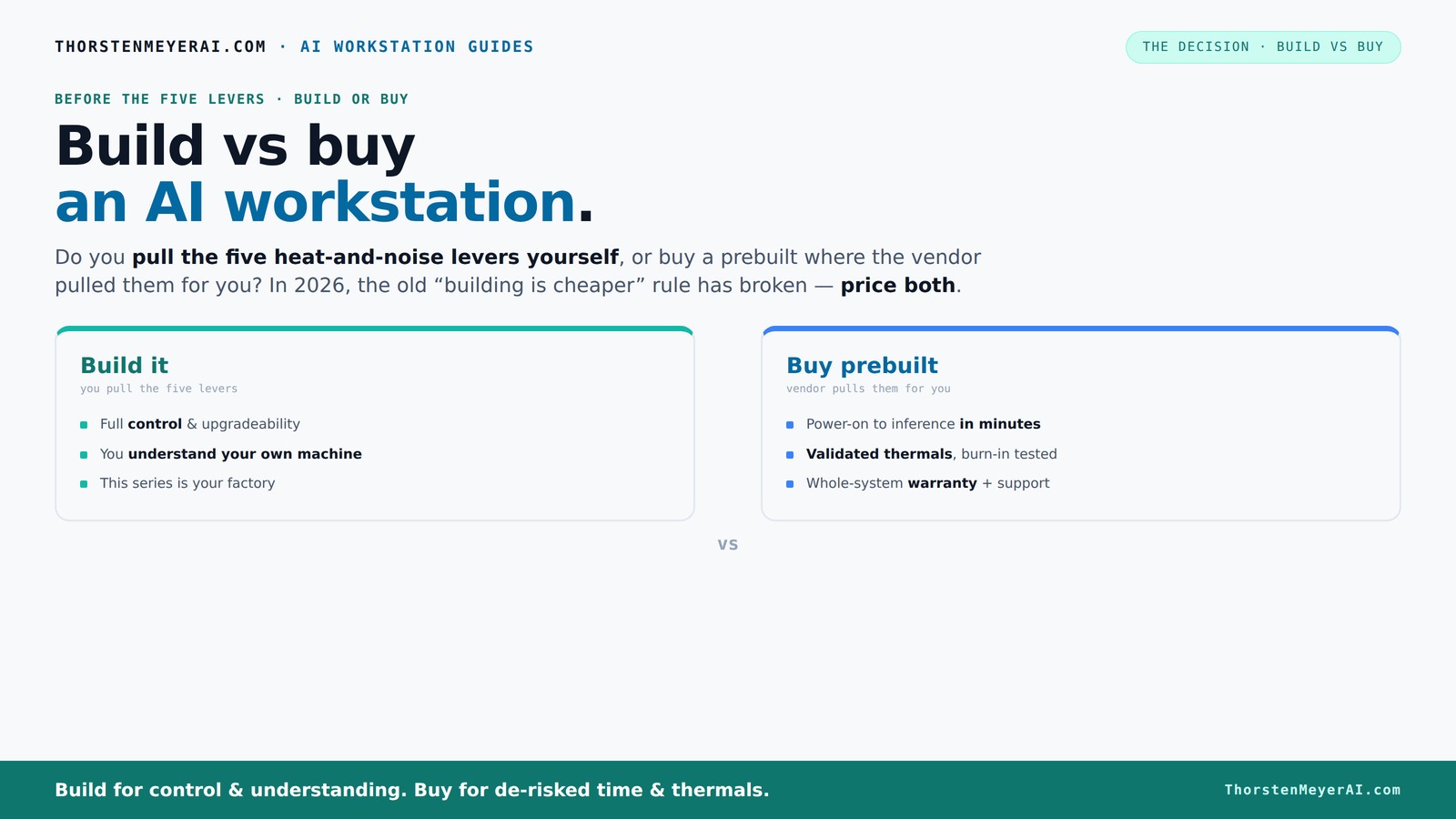
The real question behind this whole series: do you pull the five heat-and-noise levers yourself, or buy a prebuilt where the vendor pulled them for you? And in 2026, the old “building is cheaper” rule has broken. Match your situation in Part 3.
Key Takeaways
- Component shortages in 2026 make prebuilt AI workstations often just as affordable as DIY, especially when factoring in time and support.
- Deciding between build and buy hinges on your willingness to tune, troubleshoot, and support your system, versus trusting vendor validation.
- Prebuilts excel in rapid deployment, validated thermals, and warranty support—ideal for professional workflows or high-end multi-GPU setups.
- DIY builds offer unmatched customization, upgrade paths, and potential savings for hobbyists or those with specific needs.
- Focus on GPU VRAM, CPU, RAM, and storage—these are the real bottlenecks in AI workloads, not just raw specs.
As an affiliate, we earn on qualifying purchases.
Why Building Your Own AI Workstation Is No Longer Always Cheaper
Building used to be the clear winner on price, but not anymore. In fact, build vs buy a prebuilt AI workstation has become a common consideration for many. In 2026, component shortages and bulk buying by OEMs have pushed up prices for GPUs, RAM, and SSDs—sometimes by 20–50%. A DIY rig that once cost around $1,000 now easily hits $1,250 or more, without factoring in your time.
For example, a mid-range GPU like the NVIDIA RTX 4090, which was $1,200 in 2024, now costs around $1,500 due to demand spikes. Meanwhile, large prebuilt manufacturers buy these parts in bulk, often at discounted rates, and can assemble systems at comparable or even lower prices—sometimes including warranty and support.
So, the old mantra “build cheaper” no longer applies universally. Instead, you need to compare prices for your exact configuration today. This shift means that choosing between build or buy isn’t just about saving money but about balancing cost, speed, and risk.
As an affiliate, we earn on qualifying purchases.
Who Pulls the Levers? The Real Difference Between Build and Buy
Imagine your AI workstation as a furnace that needs precise control over heat and noise. When you build, you’re the one pulling the five levers: undervolting the GPU, matching the cooler, optimizing airflow, tuning fans, and placing it for ideal acoustics. This gives you exact control—and a steep learning curve.
Buy a prebuilt, and the vendor pulls those levers for you. Reputable companies like Lambda or Puget Systems run extensive tests, optimize thermals, and install quiet cooling solutions before shipping. They validate the system under sustained load, ensuring it won’t throttle or roar like a jet engine during training runs. You pay for this peace of mind, but skip the guesswork.
For example, a prebuilt system might be advertised as “30% quieter and cooler,” thanks to factory tuning. If you’re comfortable tuning your own machine, that’s a plus. But if you want a ready-to-go, reliable setup, a prebuilt can save weeks of trial and error.
Understanding this difference is crucial because thermal management directly affects performance and longevity. An improperly cooled system may throttle during intensive tasks, reducing throughput, or wear out faster due to heat stress. Conversely, a prebuilt with validated cooling solutions minimizes these risks, ensuring consistent performance and reducing downtime.
As an affiliate, we earn on qualifying purchases.
When Buying a Prebuilt Makes Sense (And When It Doesn’t)
If you’re short on time or lack the thermal engineering skills, a prebuilt is your best bet. It’s plug-and-play. Just turn it on, install your AI software stack (like CUDA, PyTorch, TensorFlow), and start training or inference in minutes. The system arrives with the OS and drivers ready to go.
Support and warranty are key advantages. Reputable vendors run burn-in tests, confirm the system won’t throttle under load, and stand behind it for years. Learn more at Build vs Buy a Prebuilt AI Workstation. If a GPU or power supply fails, they fix it—often faster than you could troubleshoot yourself.
Plus, multi-GPU setups, which are notoriously tricky to tune, are handled expertly. For more on optimizing AI hardware, visit Build vs Buy a Prebuilt AI Workstation. Vendors like Lambda optimize for load, cooling, and power delivery, reducing your risk of thermal throttling or hardware failures.
However, if your workload is highly specific—say, you need a particular GPU, custom cooling, or a certain amount of RAM—building allows tailored choices. Also, if you love tinkering or want upgrade flexibility, DIY might still be your path.
It's important to recognize that prebuilt systems often undergo extensive validation processes, which can be critical for high-stakes AI tasks. These validations include thermal testing under load, noise level assessments, and stability checks, all of which help prevent costly failures or downtime in real-world use.
As an affiliate, we earn on qualifying purchases.
When Building Your Own AI Workstation Is Still the Smart Choice
If you have time, enjoy the process, or want maximum control, building remains compelling. You can find tips on this at Build vs Buy a Prebuilt AI Workstation. You can select specific components—like a quiet GPU or a high-capacity NVMe SSD—to match your workload perfectly.
For example, a hobbyist training small models may choose affordable, quiet parts, undervolt everything, and tune airflow for silent operation. You can upgrade parts over time, swap cooling solutions, or expand storage as needed.
Plus, DIY builds often come out cheaper if you source parts smartly and avoid premium OEM pricing. Websites like geometr.info show how careful selection can yield near-silent, efficient systems.
However, this approach demands technical skill, patience, and a willingness to troubleshoot. Its success depends on understanding thermal dynamics, component compatibility, and tuning. For workloads that require high reliability or are part of critical production environments, this risk can outweigh the potential savings or customization benefits.
Comparing Total Cost of Ownership: Build or Buy?
| Factor | Build | Buy |
|---|---|---|
| Initial Cost | Often cheaper, but varies with component prices and your time | Usually similar or slightly higher, includes support and warranty |
| Time to Deploy | Weeks of sourcing, assembling, and tuning | Days, often ready to use immediately |
| Support & Warranty | Self-managed; warranties vary by parts | Vendor-backed, with support and fixed warranty periods |
| Upgradeability | High—choose your parts, swap and tune | Limited; depends on vendor options |
| Risk of Throttling/Failure | Higher—your tuning and testing matter | Lower—validated, tested, supported |
In 2026, total ownership costs often favor prebuilts due to component availability, warranty, and support. But if you love hardware work, building can still be cost-effective. Consider that the initial savings might be offset by the time spent troubleshooting, tuning, and potential downtime if issues arise. Conversely, a prebuilt's validated thermal performance and support can reduce unexpected costs and stress, especially for mission-critical workloads. The decision ultimately hinges on whether your priority is rapid deployment and peace of mind or customization and long-term upgrade potential.
What Specs Matter Most for AI Workloads?
Focus on GPU VRAM, CPU, RAM, and storage. For training large models, a GPU with at least 24GB VRAM (like the RTX 4090 or A6000) is ideal because larger VRAM allows you to handle bigger models and datasets without frequent swaps, which can bottleneck performance. CPU and RAM determine how quickly data can be processed and fed to the GPU; insufficient resources cause bottlenecks that reduce training speed and efficiency. Storage speed and capacity are critical for loading and saving large datasets quickly, minimizing idle time.
For example, a model training setup with a 48GB VRAM GPU, 128GB RAM, and a 4TB NVMe SSD will handle most AI tasks smoothly. But if you’re doing inference or smaller training, less might suffice, saving cost and power.
Choosing the right GPU is critical because it directly impacts the size of models you can train and the speed of training. Prebuilt systems emphasize GPU options like the RTX 4090 or A100, which are optimized for AI workloads. DIY builders can select cooling and power solutions tailored to these high-end parts, ensuring stability under load. See [quiet-gpus-local-ai](https://thorstenmeyerai.com/quiet-gpus-local-ai/) for quieter, efficient options that help reduce noise and heat, further improving system reliability.
Common Mistakes When Choosing Build or Buy
- Assuming DIY is always cheaper—short-term costs can hide complexity and time, and overlooked thermal management can lead to performance degradation or hardware failure.
- Overlooking thermal and noise management—poor cooling can cause thermal throttling, reducing performance and shortening hardware lifespan. Proper cooling and noise reduction are critical for sustained workloads.
- Ignoring support and warranty—hardware failures happen, especially under high load. Not having vendor support can lead to costly downtime and repairs.
- Choosing the wrong GPU or insufficient RAM—these bottlenecks limit your system’s ability to handle large models or datasets efficiently, negating any cost savings or customization advantages.
- Underestimating upgrade paths—future-proofing with compatible components and upgrade options can save money and effort later. Failing to plan for expansion might force costly replacements sooner than expected.
For example, buying a cheap case with poor airflow can cause thermal throttling, reducing your GPU's performance by 20%. On the flip side, a prebuilt with validated cooling can keep your system running at peak for years. Recognizing these pitfalls and planning accordingly ensures your investment remains productive and reliable over time.
FAQs: Your Burning Questions About Building vs Buying
- Is it cheaper to build or buy an AI workstation in 2026? It depends. Component prices are high, and bulk buying favors prebuilts. Always compare your specific parts and vendors, considering total time and support costs, as these can significantly influence overall expense.
- Which option offers better AI performance? Both can deliver similar performance if configured correctly. Prebuilts often come pre-optimized and tested, reducing setup errors and ensuring thermal and power stability, which translates into consistent performance during prolonged workloads.
- How much RAM and VRAM do I really need? For most training tasks, 64GB RAM and 24–48GB VRAM GPU are good starting points. Larger datasets or more complex models may require more. Under-provisioning can cause bottlenecks, while over-provisioning adds unnecessary cost.
- Are prebuilts reliable? Yes, especially from reputable vendors. They test systems under load, ensure thermal and acoustic performance, and include warranties that cover failures, reducing the risk of unexpected downtime and repair costs.
- Can I upgrade a prebuilt later? Usually yes, but it depends on the vendor’s design. Some OEMs limit upgrade options to core components, while others provide more flexibility. Planning ahead and verifying upgrade paths can save headaches and money in the future.
Frequently Asked Questions
Is it cheaper to build or buy an AI workstation?
In 2026, component shortages and bulk purchasing mean prebuilts often match or beat DIY prices, especially when factoring in time and support costs. Always compare your specific configuration and consider the value of validated thermal performance and warranty support, which can outweigh marginal cost differences.Which option offers better performance for AI workloads?
Both can perform equally well if configured properly. Prebuilts often come pre-optimized and tested, which can improve stability and consistent performance during intensive tasks, especially over long training runs or high-load inference.How much RAM and VRAM do I need for AI?
For most training tasks, 64GB RAM and 24–48GB VRAM GPU are ideal. Larger datasets or more complex models may require more. Under-provisioning causes bottlenecks, while over-provisioning can lead to unnecessary expense and power consumption.Are prebuilt systems reliable?
Yes, especially from reputable vendors that rigorously test their systems under load, validate thermal performance, and provide warranties. This reduces the risk of hardware failure and costly downtime, making them a safer choice for critical AI workloads.Can I upgrade a prebuilt later?
Usually, yes, but it depends on the design. Some OEMs limit upgrade options to certain components; others offer more flexibility. Planning ahead and verifying upgrade paths at purchase can ensure your system remains viable for future needs.Conclusion
The choice isn’t about raw cost anymore. It’s about what you value: immediate performance, support, and reliability, or control and customization. In 2026, smart buyers weigh workload needs against support and speed—sometimes, the prebuilt wins outright.
Imagine a system that’s ready to run, tested for heat and noise, and backed by a warranty. That’s the power of a good prebuilt. But if you love hardware tinkering, building can still be a rewarding journey—and often, a budget-friendly one.
Halloween Picks
halloween
As an affiliate, we earn on qualifying purchases.