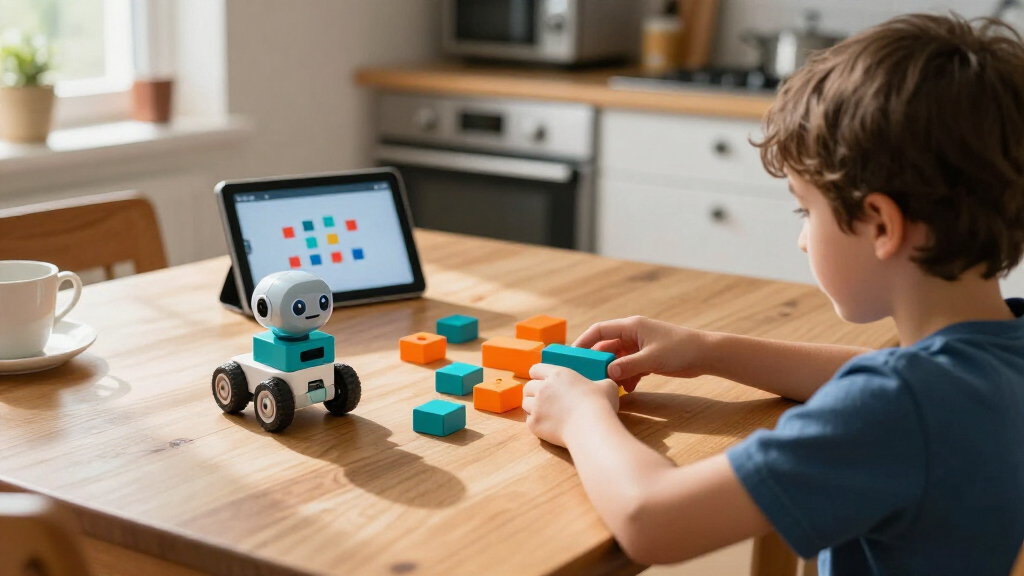

For most families, I’d start with the Makeblock mBot STEM Coding Robot Kit: it pairs a physical robot with a clear path from visual coding toward more advanced projects. The Botley Coding Robot Activity Set is a strong screen-free choice for younger children, while the Osmo Coding Kit suits kids who learn best by combining physical pieces with an iPad. The main tradeoff is between simple, guided play and kits that offer more room to build, troubleshoot, and learn code but may need adult setup. Age guidance, screen requirements, and whether a kit teaches coding through a robot, building, or activities can change which option fits best. Read on for the full breakdown of all 14 beginner coding kits for kids and how I’d choose among them.

Prime made for students and young adults
- Fast, free delivery for dorm and study essentials
- Prime Video and Amazon Music included
- Member-only deals
Key Takeaways
- The mBot STEM Coding Robot Kit is the strongest all-rounder because it combines hands-on robot interaction with a more developed coding path than simple sequence-and-go toys.
- Botley and the Kids First Coding & Robotics Kit stand out for screen-free starts, making them better matches for children who are not ready to use an app or computer as part of play.
- Makeblock CyberPi and the ELEGOO Arduino kits are more demanding than their beginner label may suggest; they offer room to grow, but adult guidance and patience with setup matter.
- The lineup splits into three learning styles: code a ready-made robot, build and program a robot, or learn through physical activities and tablet-based play.
- More pieces do not automatically mean a better first kit: a focused activity set may be easier to start, while multi-build kits such as Sillbird and BeAndge favor children who enjoy construction as much as coding.
| ELEGOO UNO R3 Smart Robot Car Kit V4 with Camera |  | Best for Older Kids Ready for Arduino | Controller: ELEGOO UNO R3 | Camera and Wi-Fi module: ESP32-WROVER-based | Control methods: App and IR remote | VIEW LATEST PRICE | See Our Full Breakdown |
| Learning Resources Botley the Coding Robot Activity Set – 77 Pieces, Ages 5+ | 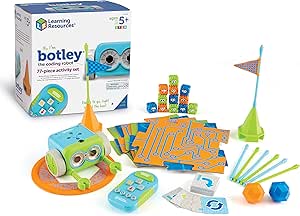 | Best Screen-Free First Coding Kit | Brand: Learning Resources | Recommended age: 5 years and up | Number of pieces: 77 | VIEW LATEST PRICE | See Our Full Breakdown |
| Sillbird 5-in-1 Programmable STEM Robot Building Kit |  | Best for Kids Who Want to Rebuild | Brand: Sillbird | Model: B883 | Pieces: 488 | VIEW LATEST PRICE | See Our Full Breakdown |
| Makeblock CyberPi Project-Based Coding Kit with Scratch and Python | 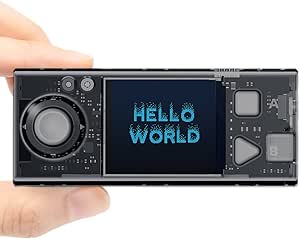 | Best for Growing from Scratch to Python | Programming languages: Scratch and Python | Software: mBlock | Connectivity: Wi-Fi and Bluetooth | VIEW LATEST PRICE | See Our Full Breakdown |
| Kids First Coding & Robotics Kit – No App Needed (Grades K-2) |  | Best Story-Led Kit for Early Learners | Brand: Thames & Kosmos | Recommended age: 4–8 years | Robot features: OID optical scanner, LED, speaker | VIEW LATEST PRICE | See Our Full Breakdown |
| Makeblock mBot STEM Coding Robot Kit for Kids |  | Best Overall Robot Coding Kit | Brand: Makeblock | Model: 90053 | Age range: 8 years and up | VIEW LATEST PRICE | See Our Full Breakdown |
| Teach Tech Mech-5 STEM Coding Robot Building Kit for Kids Ages 10+ |  | Best for Mechanical Engineering Projects | Brand: Teach Tech | Model: TTC-895 | Recommended age: 10 years and up | VIEW LATEST PRICE | See Our Full Breakdown |
| Ozobot Evo Coding Robot Kit |  | Best Screen-Free Starting Point | Brand: Ozobot | Model name: Evo Entry Kit | Age range: 5 years and up | VIEW LATEST PRICE | See Our Full Breakdown |
| ELEGOO UNO R3 Complete Starter Kit – Compatible with Arduino |  | Best for Budding Electronics Programmers | Components included: 200+ components across 63 types | Controller: ELEGOO UNO R3, Arduino compatible | Power supply: 9 V / 1 A adapter, 9 V battery holder, USB cable | VIEW LATEST PRICE | See Our Full Breakdown |
| Osmo Coding Kit for Kids (Ages 5-10+) – STEM Learning with iPad |  | Best Tangible Coding Games | Brand: Osmo | Model number: 901-00021 | Age range: 5–12 years | VIEW LATEST PRICE | See Our Full Breakdown |
| Makeblock mBot Arduino Robot Kit with Scratch Coding Box for Kids Ages 8–12 |  | Best for Growing Into Arduino | Recommended age: 8–12 years | Coding platforms: Scratch-style block coding and Arduino | Projects: Four projects stated; line following, obstacle avoidance, and remote control named | VIEW LATEST PRICE | See Our Full Breakdown |
| BeAndge 6-in-1 Robotics STEM Kit for Kids Ages 8–12 |  | Best for Variety in Hands-On Building | Brand: BeAndge | Recommended age: 8–12 years | Project count: 6-in-1 STEM kit | VIEW LATEST PRICE | See Our Full Breakdown |
| Playz My First Coding and Computer Science Kit |  | Best for Early Screen-Free Coding Concepts | Brand: Playz | Age range: 6 years and up | Educational objectives: Coding and sorting skills | VIEW LATEST PRICE | See Our Full Breakdown |
| Thames & Kosmos My Robotic Pet: Coding Chameleon |  | Best for Screen-Free Robot Play | Brand: Thames & Kosmos | Model: My Robotic Pet: Coding Chameleon | Recommended age: 8–12 years | VIEW LATEST PRICE | See Our Full Breakdown |
| beginner coding kits for kid | Brand | Recommended age | Included components |
|---|---|---|---|
| ELEGOO UNO R3 Smart Robot Car | — | 12 years and up | — |
| Learning Resources Botley the | Learning Resources | 5 years and up | Botley robot, remote programmer, detachable robot arms, 40 coding cards, 6 double-sided tiles, 27 obstacle building pieces, starter guide |
| Sillbird 5-in-1 Programmable S | Sillbird | 8 years and up | — |
| Makeblock CyberPi Project-Base | — | 8–12 years | — |
| Kids First Coding & Robotics K | Thames & Kosmos | 4–8 years | Robot, code cards, story cards, building pieces, full-color experiment manual |
| Makeblock mBot STEM Coding Rob | Makeblock | — | — |
| Teach Tech Mech-5 STEM Coding | Teach Tech | 10 years and up | Assembly parts and English instruction manual |
| Ozobot Evo Coding Robot Kit | Ozobot | — | 1 Evo robot, Get Started activities, 1 charging cable, 5 dual-tip Color Code markers, 1 zip case |
| ELEGOO UNO R3 Complete Starter | — | — | — |
| Osmo Coding Kit for Kids | Osmo | — | Osmo Base, iPad reflector, 31 tangible coding blocks, 3 game apps, stackable storage |
| Makeblock mBot Arduino Robot K | — | 8–12 years | — |
| BeAndge 6-in-1 Robotics STEM K | BeAndge | 8–12 years | Electronic kit components, mini screwdriver, and instructions |
| Playz My First Coding and Comp | Playz | — | More than 30 tools, ingredients, and parts |
| Thames & Kosmos My Robotic Pet | Thames & Kosmos | 8–12 years | Plastic building parts and manual |
More Details on Our Top Picks
ELEGOO UNO R3 Smart Robot Car Kit V4 with Camera
The ELEGOO robot car is the strongest fit here for kids ready to move beyond simple screen-free sequences and start programming hardware with Arduino IDE. Its UNO R3 controller, camera, and driving features give lessons a visible result: code can change how the car moves, tracks a line, or responds to obstacles. Compared with Botley, it asks for much more assembly and programming effort, so it suits older beginners rather than young children looking for quick wins. The app and IR remote offer ways to drive the car before or alongside coding, while the rechargeable battery avoids disposable cells. The tradeoff is a steeper setup curve, and the age guidance of 12 years and up reflects the patience and adult help many first-time builders will need.
Pros:- Arduino UNO R3 introduces a widely used platform for coding physical devices.
- FPV video, line tracking, and obstacle avoidance make code-driven behavior easy to observe.
- App and IR remote provide two control options.
- Rechargeable battery is included.
Cons:- Assembly and programming can be demanding for a first-time builder without adult guidance.
- Recommended for ages 12 and up, so it is less suitable for younger children than the other beginner-focused kits here.
Best for: Kids 12 and up who want to assemble a programmable car and are ready to learn Arduino with adult guidance available.
Not ideal for: Young beginners or families seeking a ready-to-use, screen-free first coding activity; assembly and Arduino programming take more effort than Botley.
- Controller:ELEGOO UNO R3
- Camera and Wi-Fi module:ESP32-WROVER-based
- Control methods:App and IR remote
- Features:FPV video, line tracking, obstacle avoidance, auto follow
- Battery:2000 mAh rechargeable lithium-ion
- Recommended age:12 years and up
- Dimensions:8 x 7 x 6 inches
- Weight:1.23 kg
Our verdict“Choose this kit for an older child who wants a substantial Arduino car project, not a quick or screen-free introduction.”
Learning Resources Botley the Coding Robot Activity Set – 77 Pieces, Ages 5+
Botley is the easiest entry point in this group for a child who is just beginning to think in sequences, loops, and routes. The remote programmer sends commands directly to the robot, while coding cards and obstacle pieces let children plan a path they can see play out. That makes the basic idea of debugging more tangible than a screen-based lesson, and the kit needs little assembly before play. Compared with the story-led Thames & Kosmos Kids First Coding & Robotics Kit, Botley leans more on building and rerunning obstacle challenges than on guided story lessons. Its 77-piece activity set supports varied setups, but older children may find the command-based play less challenging over time. It also needs AAA batteries, which are not included.
Pros:- Screen-free programming keeps the focus on physical commands and robot movement.
- Ready to use with minimal assembly.
- Coding cards, tiles, and obstacle pieces support repeatable route challenges.
- Detachable arms add a hands-on play element beyond programming movement.
Cons:- Requires multiple AAA batteries, which are not included.
- Command-based activities may feel limited to older children or learners ready for more advanced coding.
Best for: Families with children around age five and up who want hands-on sequencing and obstacle challenges without a phone or tablet.
Not ideal for: Older kids seeking a path into text-based coding or families who want a rechargeable kit; Botley is aimed at younger learners and requires AAA batteries.
- Brand:Learning Resources
- Recommended age:5 years and up
- Number of pieces:77
- Included components:Botley robot, remote programmer, detachable robot arms, 40 coding cards, 6 double-sided tiles, 27 obstacle building pieces, starter guide
- Power:Multiple AAA batteries required; not included
- Model number:LER2935
- Warranty:No warranty
Our verdict“Pick Botley for a young beginner who learns best by giving a robot physical commands and watching the result.”
Sillbird 5-in-1 Programmable STEM Robot Building Kit
This kit puts construction at the center of the coding experience: kids assemble a model, then use app or remote controls and basic programming features to bring it to life. Its five build options, including a robot, dinosaur, car, and tank, give it more rebuild variety than the ELEGOO robot car, which focuses on one more advanced vehicle. That variety can help keep a child interested after the first project, but it also means completing the builds takes time and attention. The 488-piece assembly makes this a better match for patient builders around age eight and up than for children who want an immediate coding activity like Botley. Play lasts up to 40 minutes per charge, so sessions may need to pause for recharging.
Pros:- Five model options offer more rebuilding variety than a single-vehicle kit.
- App and remote control provide different ways to operate the models.
- Basic programming features connect building with introductory coding.
- Rechargeable operation provides up to 40 minutes of play per charge.
Cons:- The 488-piece build requires time and patience before play.
- Up to 40 minutes of play per charge may limit longer sessions.
Best for: Children age eight and up who enjoy building different moving models and want app or remote control alongside introductory programming.
Not ideal for: Kids who dislike following multi-step builds or families seeking longer uninterrupted play; the kit has 488 pieces and up to 40 minutes of play per charge.
- Brand:Sillbird
- Model:B883
- Pieces:488
- Buildable models:5, including a robot, dinosaur, car, and tank
- Control methods:Bluetooth app and remote control
- Play time:Up to 40 minutes per charge
- Recommended age:8 years and up
- Dimensions:6 x 7 x 8 inches
Our verdict“Choose Sillbird for a child who values building and rebuilding models as much as learning simple programming.”
Makeblock CyberPi Project-Based Coding Kit with Scratch and Python
CyberPi is the clearest choice here for a learner whose goal is to progress from visual coding toward text-based programming. Its mBlock lessons guide users through Scratch and Python, giving this kit a more explicit learning progression than the Sillbird set’s basic programming features. The CyberPi and Pocket Shield add sensors, a speaker, a color display, and ports for motors and servos, so projects can respond to motion, light, or sound rather than only follow preset commands. Up to 37 step-by-step lessons offer structure, and broad device compatibility helps families use an available computer or mobile device. The tradeoff is that this is less of a ready-made robot build than the ELEGOO car, and some projects may need extra electronic modules.
Pros:- Supports progression from Scratch to Python through mBlock.
- Sensors and display support varied interactive projects.
- Up to 37 guided lessons provide a structured starting point.
- Compatible with Windows, Mac, Linux, Chromebook, and mobile devices.
Cons:- Some projects may require additional third-party electronic modules.
- The project-based electronics focus may be less immediately engaging for children who mainly want a ready-to-drive robot.
Best for: Learners around ages 8–12 who want guided Scratch projects now and a route into Python, with access to a compatible device.
Not ideal for: Families seeking an app-free robot or a complete, single build with no possible extra components; some projects may require additional electronic modules.
- Programming languages:Scratch and Python
- Software:mBlock
- Connectivity:Wi-Fi and Bluetooth
- Sensors and components:Light sensor, microphone, speaker, full-color LED display, 3-axis accelerometer, gyroscope
- Battery:Rechargeable 800 mAh lithium-ion
- Expansion ports:2 DC motor ports and 2 servo ports
- Lessons:Up to 37 step-by-step lessons
- Recommended age:8–12 years
- Compatible devices:Windows, Mac, Linux, Chromebook, and mobile devices
Our verdict“Choose CyberPi for a learner who wants structured Scratch projects with a clear next step toward Python.”
Kids First Coding & Robotics Kit – No App Needed (Grades K-2)
For children who respond better to a story than to an open-ended robot challenge, this kit turns coding concepts into physical, guided activities. Kids use code cards with the robot’s optical scanner to direct movement and explore actions involving lights, sounds, and simple mechanisms. Its 64-page manual and progressive lessons give adults a clearer teaching path than Botley’s obstacle-course format, while the app-free design keeps the activity off phones and tablets. The tradeoff is that children may need adult help with setup and operation, and the story modules can offer less replay value after they are complete. This makes the kit a better fit for guided early learning than CyberPi, which targets learners ready to work in Scratch and Python.
Pros:- App-free coding uses physical cards and a robot scanner.
- Story-based lessons connect coding commands to guided activities.
- Manual covers sequencing, loops, conditionals, functions, and variables.
- Includes building pieces and robot features for movement, lights, and sounds.
Cons:- Younger children may need adult assistance to set up and operate the kit.
- Replay value may decline after the story modules are completed.
Best for: Families and early-grade educators introducing coding to children ages 4–8 through guided stories, physical code cards, and adult-supported activities.
Not ideal for: Older children wanting open-ended projects or independent digital coding; the story modules may have limited replay value and younger users may need setup help.
- Brand:Thames & Kosmos
- Recommended age:4–8 years
- Robot features:OID optical scanner, LED, speaker
- Included components:Robot, code cards, story cards, building pieces, full-color experiment manual
- Manual:64-page full-color experiment manual
- Lessons:30 progressive lessons
- Model number:567012
- Manufacturer warranty:1 year against manufacturer defects
Our verdict“Pick this kit for a young learner who benefits from structured, story-based coding without a screen.”
Makeblock mBot STEM Coding Robot Kit for Kids
The mBot is my strongest all-around pick for a child who wants to build a robot and then make it do something. Assembly takes about 15 minutes, so it gets to hands-on coding faster than the Teach Tech Mech-5, which calls for several hours of building. From there, Scratch and mBlock activities offer a gentler starting point, while Arduino gives curious kids room to move toward more technical projects. Line following, obstacle avoidance, and remote-control play also make the robot rewarding before a child writes much code. Its compatibility with add-on modules and LEGO parts gives it more room to grow than the more focused Ozobot Evo. The tradeoff is that the mBot depends on separate batteries and a child ready for a physical robot; families after a screen-free, marker-based introduction may prefer Ozobot.
Pros:- Combines hands-on robot assembly with Scratch, mBlock, and Arduino programming options.
- Line following, obstacle avoidance, and remote control make it engaging before coding skills develop.
- About 15 minutes of assembly gets beginners to the play and programming stages quickly.
- Add-on modules, many electronic parts, and LEGO compatibility support future experimentation.
Cons:- Four AA batteries for the robot and one CR2025 battery for the remote are not included.
- Its physical robot and programming setup may be less suitable for families seeking a screen-free first coding experience.
Best for: Families seeking a first buildable robot for children eight and up, with accessible Scratch activities and a path toward Arduino projects.
Not ideal for: Families who want a fully screen-free coding kit or do not want to supply separate batteries for the robot and remote.
- Brand:Makeblock
- Model:90053
- Age range:8 years and up
- Programming platforms:Scratch, Arduino, mBlock
- Functions:Line following, obstacle avoidance, remote control
- Assembly time:About 15 minutes
- Robot batteries:4 AA batteries, not included
- Remote controller battery:1 CR2025 battery, not included
- Compatibility:Makeblock add-on packs, 100+ electronic modules, 500+ parts, and LEGO parts
Our verdict“Choose the mBot for a child ready to build and program a versatile robot, provided you have the required batteries.”
Teach Tech Mech-5 STEM Coding Robot Building Kit for Kids Ages 10+
The Mech-5 suits older beginners who want coding tied to how a machine moves, lifts, or throws—not just how a screen character behaves. Its coding wheel directs a range of mechanical actions, including rotating, kicking, and drawing, giving kids a concrete way to connect instructions with cause and effect. That makes it a more mechanics-focused choice than the Makeblock mBot, which offers quicker assembly and a broader mix of Scratch, mBlock, and Arduino activities. The Mech-5’s main cost is time: the build takes multiple hours, so it is better for a patient child who enjoys following assembly steps than someone hoping to start coding right away. The supplied English instructions help guide construction, but the kit’s longer build and unspecified power source make it a less convenient first robot than the mBot.
Pros:- Connects basic coding ideas to visible mechanical actions such as lifting, throwing, and drawing.
- Offers several distinct robot actions to explore through the coding wheel.
- Step-by-step English assembly instructions support the build process.
- Focuses on mechanical engineering as well as coding and problem solving.
Cons:- Assembly takes multiple hours, a much longer start than the Makeblock mBot’s roughly 15-minute build.
- The product data does not specify a power source.
- Its recommended age of 10 and up makes it less suitable for younger first-time coders.
Best for: Children aged 10 and up who enjoy building mechanisms and can set aside several hours before reaching the programming activities.
Not ideal for: Younger children or families seeking a quick-start robot with clearly specified power requirements and fast access to coding.
- Brand:Teach Tech
- Model:TTC-895
- Recommended age:10 years and up
- Educational objectives:Coding, problem solving, programming, and STEM
- Robot actions:Moves forward and backward, rotates 360 degrees, throws, lifts, kicks, and draws
- Power source:Not specified
- Build time:Multiple hours
- Included components:Assembly parts and English instruction manual
- Warranty:1 year against manufacturer defects
Our verdict“Pick the Mech-5 for an older child who values a substantial mechanical build more than a quick start.”
Ozobot Evo Coding Robot Kit
The Ozobot Evo Entry Kit is the easiest fit here for a young child who should start with coding ideas before taking on a large construction project. Kids can guide the robot with Color Codes drawn with the included markers, then move into Ozobot Blockly as they are ready for screen-based work. Its five skill levels and more than 700 free lessons offer a longer learning runway than the Osmo Coding Kit, which centers its learning around three iPad apps and physical blocks. Ozobot’s small robot and zip case also suit classroom sharing or moving between home and school. The tradeoff is a narrower physical build-and-electronics experience than the Makeblock mBot; the entry kit also supplies only five dual-tip markers, which may limit varied drawing activities without more supplies.
Pros:- Color Codes let beginners direct the robot without starting on a screen.
- Ozobot Blockly provides a next step as children gain confidence.
- Five skill levels and more than 700 free lessons support continued learning.
- A zip case and included charging cable help with storage and classroom use.
Cons:- The entry kit includes only five dual-tip markers, limiting color choices for expanded activities.
- It offers less robot building and electronics exploration than the Makeblock mBot.
- Children who want a tangible block-based activity may prefer the iPad-centered Osmo Coding Kit.
Best for: Families and classrooms introducing coding to children five and up who want a screen-free first step plus an option to progress online.
Not ideal for: Children who want to construct a robot or explore electronics, or families seeking a kit with a larger set of markers included.
- Brand:Ozobot
- Model name:Evo Entry Kit
- Age range:5 years and up
- Included components:1 Evo robot, Get Started activities, 1 charging cable, 5 dual-tip Color Code markers, 1 zip case
- Programming options:Color Codes and Ozobot Blockly
- Skill levels:5
- Free lessons:Over 700
- Battery type:Lithium-Ion
- Product dimensions:8.5 x 6.5 x 1.8 inches
Our verdict“Choose Ozobot Evo for a young beginner who can start with marker-based coding and grow into Blockly.”
ELEGOO UNO R3 Complete Starter Kit – Compatible with Arduino
The ELEGOO UNO R3 Complete Starter Kit is a step up in electronics breadth, not the simplest introduction to coding. Its 200-plus components span 63 types, letting a motivated beginner move from basic LEDs toward sensors, displays, RFID, and motors. Pre-soldered modules and a solderless breadboard remove soldering from the early learning curve, while the organized case helps keep small parts sorted. Compared with the Makeblock mBot, this kit gives more room to assemble varied Arduino projects, but it does not offer the same ready-to-drive robot experience. That flexibility can be a lot for a child who needs guided, age-focused activities; the mBot’s robot tutorials are a more approachable first step. ELEGOO’s PDF tutorials and example code help, though its documentation may not provide enough depth for advanced builds.
Pros:- Includes 200+ components across 63 types for a wide range of project ideas.
- Pre-soldered modules and a solderless breadboard reduce setup barriers.
- Power adapter, battery holder, and USB cable provide several listed power options.
- Organized case, PDF tutorials, and Arduino example code help manage and start projects.
Cons:- The large component assortment can overwhelm an absolute beginner.
- Unlike the Makeblock mBot, it is not a ready-to-drive coding robot kit.
- Documentation may not be detailed enough for advanced projects.
Best for: Older beginners or families comfortable with Arduino who want a broad parts collection for experimenting with electronics projects.
Not ideal for: Young first-time coders who need a simple guided activity or want an assembled robot with immediate movement-based play.
- Components included:200+ components across 63 types
- Controller:ELEGOO UNO R3, Arduino compatible
- Power supply:9 V / 1 A adapter, 9 V battery holder, USB cable
- Breadboard:Solderless breadboard with power module
- Storage:Organized case with small-parts box
- Supported sensors and modules:LCD1602, RC522 RFID, RTC, HC-SR501 PIR, ultrasonic sensor, DHT11, GY-521 MPU6050, MAX7219, keypad, joystick, relay, SG90 servo, stepper motor
- Programming platform:Arduino IDE
Our verdict“Choose ELEGOO when a budding programmer is ready to explore many Arduino electronics projects rather than follow a single robot path.”
Osmo Coding Kit for Kids (Ages 5-10+) – STEM Learning with iPad
The Osmo Coding Kit is a strong choice for children who learn better by arranging physical pieces than by starting with a keyboard or building a robot. Its 31 coding blocks pair with three iPad apps: one introduces sequencing through a character, another turns coding into music-making, and the third adds collaborative puzzles. That mix makes the kit more game-led and varied than the Ozobot Evo, whose core screen-free activity relies on drawing Color Codes for a robot. Osmo can work without Wi-Fi, but it cannot work without a compatible iPad, which is not included. That device requirement is a bigger hurdle than Ozobot’s included robot and charging cable. The reflector may also need adjustment with newer thin-bezel iPads, so I would choose this only if the family already has a supported device.
Pros:- Physical coding blocks make sequencing and instructions easier to manipulate.
- Three apps cover coding play, music creation, and puzzles.
- Works without Wi-Fi, unlike kits that depend on an online connection.
- Supports a range of iPad models running iOS 15 or later.
Cons:- A compatible iPad is required and is not included.
- The reflector may need adjustment with newer thin-bezel iPads.
- Unlike the Ozobot Evo, it does not include a robot for children to direct through physical movement.
Best for: Families with a compatible iPad who want a playful introduction to sequencing, creative coding, and puzzle solving for children aged 5–12.
Not ideal for: Households without a compatible iPad, or families looking for a standalone robot or a screen-free kit.
- Brand:Osmo
- Model number:901-00021
- Age range:5–12 years
- Coding blocks:31
- Included components:Osmo Base, iPad reflector, 31 tangible coding blocks, 3 game apps, stackable storage
- Apps:Coding Awbie, Coding Jam, Coding Duo
- Compatibility:iPad models running iOS 15 or later: 5th–11th gen iPad, iPad Air, iPad mini, iPad Pro
- Wi-Fi requirement:Works without Wi-Fi
- Warranty:90-day warranty against manufacturer defects
Our verdict“Choose Osmo if you already have a compatible iPad and want app-guided coding play with hands-on blocks.”
Makeblock mBot Arduino Robot Kit with Scratch Coding Box for Kids Ages 8–12
A clear path from visual coding to Arduino gives this robot kit a useful progression for kids who are ready to move beyond one-off activities. Guided projects cover line following, obstacle avoidance, and remote control, so children can see code affect how a robot behaves. Assembly takes about 15 minutes, which leaves more time for programming than a complex build might. Compared with the Thames & Kosmos My Robotic Pet: Coding Chameleon, mBot puts more emphasis on coding progression and robot-control projects, while the chameleon offers screen-free action-card play and interactive pet features. The tradeoff is that troubleshooting may call for adult or beginner support, and the supplied description lists four projects but names only three. This is a stronger fit for families seeking a guided route toward Arduino than for children who want entirely screen-free play.
Pros:- Moves from Scratch-style block coding toward Arduino
- Guided projects include visual instructions and troubleshooting tips
- About 15-minute assembly keeps the setup manageable
- Projects connect coding with line following, obstacle avoidance, and remote control
Cons:- Troubleshooting may require adult or beginner support
- The description says four projects are included but names only three
Best for: Kids ages 8–12 who want guided robot projects now and a route from block coding toward Arduino as their skills grow
Not ideal for: Families seeking screen-free coding or a kit that avoids adult help when a build or program needs troubleshooting
- Recommended age:8–12 years
- Coding platforms:Scratch-style block coding and Arduino
- Projects:Four projects stated; line following, obstacle avoidance, and remote control named
- Assembly time:About 15 minutes
- Learning focus:Programming, electronics, and problem-solving
- Instructions:Building manual with visual project instructions and troubleshooting tips
Our verdict“Choose mBot if your child wants guided robot challenges with a path from block coding toward Arduino.”
BeAndge 6-in-1 Robotics STEM Kit for Kids Ages 8–12
Project variety is the main draw: this kit mixes a reptile robot and balance car with a bubble machine, fiber lamp, and buzzer wire game. That range gives kids different ways to explore building and basic circuits instead of returning to a single robot format. The included step-by-step instructions and mini screwdriver make it more approachable as a hands-on construction set than an open-ended electronics kit such as the ELEGOO UNO R3 Complete Starter Kit, which is aimed at Arduino-compatible tinkering. But the BeAndge description does not explain a specific coding platform or how children program the projects, so it is less direct as a coding lesson than the Makeblock mBot Arduino Robot Kit. Families also need to supply AA batteries and bubble solution. Pick it for varied STEM builds, not for a clearly defined progression in coding.
Pros:- Combines robot builds with several different science activities
- Step-by-step instructions support guided assembly
- Mini screwdriver is included
- Activities introduce building, circuits, and problem-solving
Cons:- AA batteries and bubble solution are not included
- The product description does not specify a coding platform or explain how the projects teach programming
Best for: Families with children ages 8–12 who enjoy switching between small build-and-circuit projects and can supply the required materials
Not ideal for: Buyers seeking a clearly specified coding platform or programming progression, or a kit ready to use without separate batteries and bubble solution
- Brand:BeAndge
- Recommended age:8–12 years
- Project count:6-in-1 STEM kit
- Named projects:Reptile robot, balance car, bubble machine, fiber lamp, and buzzer wire game
- Included components:Electronic kit components, mini screwdriver, and instructions
- Required items not included:AA batteries and bubble solution
- Educational objectives:Coding, motor skills, problem-solving, and STEM
- Warranty:Lifetime warranty against manufacturer’s defects
Our verdict“Choose BeAndge for varied hands-on STEM projects, but pick mBot instead if a defined coding pathway matters most.”
Playz My First Coding and Computer Science Kit
Concrete activities make abstract ideas approachable in this kit: children can make binary necklaces, explore encryption, sort objects, and solve mazes. That variety introduces computer-science concepts without requiring a robot build or coding device, which makes it a different starting point from the Makeblock mBot Arduino Robot Kit, where kids program a moving robot and can later progress to Arduino. Playz includes 30-plus tools and parts and an illustrated guide with instructions and learning information, giving families a set of guided activities rather than an open-ended programming platform. The tradeoff is that the supplied details do not identify a coding language or interactive robot, so children looking to write code and watch a machine respond may find mBot a better match. The title and manufacturer age recommendation also differ; check age suitability before choosing.
Pros:- Introduces coding and computer-science ideas through hands-on activities
- Includes more than 30 tools, ingredients, and parts
- Illustrated guide provides instructions and educational information
- Activities include binary, encryption, sorting, and mazes
Cons:- The description does not specify a coding language or programmable robot
- The listed age range differs between the title and manufacturer recommendation
Best for: Families introducing children to coding concepts through physical activities such as binary, sorting, encryption, and mazes
Not ideal for: Children who specifically want to program a robot, use a named coding platform, or progress into text-based coding
- Brand:Playz
- Age range:6 years and up
- Educational objectives:Coding and sorting skills
- Included components:More than 30 tools, ingredients, and parts
- Activities:Binary necklaces, encryption, sorting, and mazes
- Guide:Illustrated guide with instructions and educational information
- Dimensions:12.2 x 10.1 x 2.8 inches
- Weight:1.1 pounds
Our verdict“Choose Playz for an activity-based introduction to computer-science ideas, not for programmable robot practice.”
Thames & Kosmos My Robotic Pet: Coding Chameleon
Physical action cards replace screen-based programming here: children build a 15-inch chameleon and program its movements in three play modes. Touch and infrared sensors support interaction, while a color sensor and RGB LEDs let it respond to its surroundings. That makes the chameleon a more tactile coding introduction than the Makeblock mBot Arduino Robot Kit, which offers a clearer move from block coding toward Arduino but depends on a screen-based coding setup. The 48-page guide also introduces robotics and biomimicry, giving the build a science angle beyond play. The tradeoff is the assembly: children may need adult help, and independent play is recommended for ages 12 and up. Choose this for screen-free, character-led interaction; skip it if your child wants a more explicit coding progression or solo building at a younger age.
Pros:- Physical action cards support screen-free coding
- Three play modes offer coding, wild, and pet interactions
- Touch, infrared, and color sensors enable responsive behaviors
- 48-page guide introduces robotics and biomimicry
Cons:- Assembly may require adult help for children ages 8–11
- Independent play is recommended for ages 12 and up
- Action-card coding does not offer the stated progression to Arduino found in mBot
Best for: Families with children ages 8–12 who want a buildable robot with screen-free, card-based coding and interactive play
Not ideal for: Younger children expected to assemble and play independently, or learners seeking a progression into Arduino or text-based coding
- Brand:Thames & Kosmos
- Model:My Robotic Pet: Coding Chameleon
- Recommended age:8–12 years
- Length:15 inches
- Play modes:Coding, Wild, and Pet
- Sensors:Color sensor and infrared sensor
- Lighting:RGB LEDs
- Manual:48 pages
- Included components:Plastic building parts and manual
Our verdict“Choose the chameleon for screen-free, interactive robot play, and choose mBot if a coding progression toward Arduino is the priority.”
How We Picked
I compared the kits by how readily a child can begin, how clearly each one connects an action to a coding idea, and how much support an adult may need to provide. I also weighed age fit, screen and device requirements, the role of building versus programming, and whether the kit appears to offer a sensible next step after introductory activities. These criteria matter because a kit can be technically capable yet frustrating as a first experience if setup, instructions, or coding concepts outpace the child.
The ranking favors approachable learning with enough room to keep a child interested, rather than the largest parts count or the most advanced coding language. That puts adaptable options such as the Makeblock mBot near the top, while screen-free activity kits earn their place for younger beginners and Arduino-oriented kits sit lower for families seeking a low-support first purchase. Specialty picks remain useful for specific ages and preferences, but their narrower format makes them less suitable as a default recommendation.
Factors to Consider When Choosing Beginner Coding Kits For Kids
Before choosing a kit, I’d match its learning format to the child and the adult who will help with it. The easiest-looking option is not always the best fit: a child who loves building may quickly outgrow a simple robot, while an ambitious electronics kit can stall if no one is available to help troubleshoot. These checks can prevent a mismatch before you buy.
Match the Coding Style to the Child
Beginner kits teach through different kinds of play: some ask children to arrange commands, others use block-based software, and a few introduce text-based coding or electronics. Start with what the child already enjoys, such as telling a robot where to go, constructing a model, or solving short activity challenges. A child drawn to physical movement may connect quickly with a programmable robot, while a patient builder may prefer a kit where assembly is part of the lesson. Avoid choosing a kit just because it mentions Python or Arduino; those labels do not mean the first activities will be easy. The best first step is one where the child can predict what a command will do and see the result without a long setup.
Treat Age Guidance as a Starting Point
Age labels are useful, but reading ability, fine-motor skills, patience, and experience with following instructions can matter just as much. Younger children may need large, tangible pieces and short activities, while older beginners can handle more open-ended tasks if they enjoy working through mistakes. A kit aimed at an older age can still be a poor fit when its instructions assume electronics or computer familiarity. On the other hand, an older child may lose interest in a kit designed around very simple commands, even if the recommended age includes them. Check whether the first projects are genuinely accessible and whether later ones give the child room to advance.
Check Screens, Devices, and Setup Before Buying
Some kits work without an app, some require a tablet or computer, and others pair physical components with software. That difference affects where a child can play, how much screen time the kit adds, and whether another device must be available. Confirm compatibility with the family’s actual operating system and device rather than assuming that a tablet-based product will work with any tablet. Also look for setup steps that may require charging, connecting, installing software, or creating an account. A child who wants to begin independently may do better with a direct, screen-free activity than with a kit whose first challenge is getting hardware connected.
Decide How Much Building Belongs in the Lesson
Robot-building kits combine construction and coding, which can make the learning feel tangible but also add time before the first program runs. For children who enjoy assembling models, that work is part of the reward; for children who mainly want to make something move, it can become a barrier. Look at whether the kit offers one main build or several configurations, and ask whether rebuilding is likely to sustain interest or slow it down. More parts can bring variety, but they also raise the chance of misplaced pieces and adult help during assembly. A ready-to-use robot or activity set may be a better first purchase when the goal is to introduce programming concepts quickly.
Plan for Adult Support and Troubleshooting
Even child-focused kits differ in how much they expect a grown-up to explain, assemble, or debug. A screen-free sequencing activity can be relatively easy to share, while robotics and electronics kits may involve wiring, software, or unclear errors that need an adult’s help. If the child will use the kit alone, prioritize clear instructions and a short route from opening the box to completing a first task. If an adult enjoys coding or building alongside the child, a more complex kit can become a shared project rather than a source of frustration. Don’t mistake independence for a lack of learning: guided discussion and fixing a mistaken command are valuable, but the support level should fit the household.
Choose for the Next Step, Not Just the First Hour
A good beginner kit should make the first activity approachable and give the child a reason to return. Think about whether the projects progress from basic sequences to loops, conditions, sensors, or more open-ended challenges, depending on the child’s readiness. A tightly guided kit can be reassuring at first but may have limited replay value once its activities are familiar. A flexible platform may last longer, though it can feel less structured to a new learner. I’d favor a clear progression that fits the child’s current interest over a promise of advanced features they may not use for months.
Frequently Asked Questions
Which kind of kit is easiest for a child who has never coded?
For a child with no coding experience, I’d choose a kit that makes commands visible and produces an immediate result, rather than one that begins with wiring or text-based code. Botley and the Kids First Coding & Robotics Kit are screen-free routes into sequencing, while Osmo combines physical pieces with tablet activities. The right choice depends on whether the child prefers a moving robot, hands-on puzzles, or a screen-supported game. Keep the first session short and let the child change one command at a time so the cause and effect stay clear.
Do I need to buy a computer or tablet for these kits?
Not for every option in this roundup. Botley and the Kids First Coding & Robotics Kit are designed around screen-free activities, while Osmo relies on an iPad-based format. Several robot and programmable kits use software or a computer for coding, so check the product’s device and compatibility requirements before choosing. If the child will share a family device, factor in whether it will be available during play and whether setup needs adult help. A kit that depends on a device you do not have can turn into an unused gift.
Is an Arduino kit a good first coding kit for a child?
It can be a fit for an older or especially curious beginner, but Arduino-style kits usually ask for more patience than a simple coding robot. The learning may include electronics, assembly, and troubleshooting alongside programming, so a child may need an adult who can help when a circuit or program does not work. For a first experience focused on coding ideas, a guided robot or activity kit can provide a gentler start. Choose an Arduino option when the child enjoys figuring out how components work and the family is ready to support experiments.
Should I choose a coding robot or a robot-building kit?
Choose a ready-to-use coding robot when the child wants to start programming quickly and see commands affect movement. A building kit is a better match when construction itself is part of the appeal and the child is comfortable following assembly steps before reaching the coding activities. Building can deepen understanding of how a robot is put together, but it adds time and can require adult assistance. If you are unsure, look for a kit with a clear first project and enough later activities to keep either interest alive. The child’s preferred kind of play is a better guide than the number of included builds.
How can I tell whether a kit will stay interesting after the first projects?
Look for evidence of progression, not just a long list of activities or multiple models. A useful kit moves from simple instructions toward challenges that let the child change the program, solve a problem, or combine concepts. A kit with several builds may offer variety, but it may not teach a deeper coding idea in each one. Conversely, a focused robot can remain engaging if the software supports new challenges or more advanced programming. Match the likely next step to the child: a young beginner may value repeatable guided play, while an experienced builder may want open-ended projects sooner.
Conclusion
For the broadest fit, I’d choose the Makeblock mBot STEM Coding Robot Kit as the best overall option, with a balance of hands-on play and a path toward more involved coding. For a best beginner pick among younger children, Botley offers a screen-free introduction; for best value in a simple first experience, the Kids First Coding & Robotics Kit is worth a close look. Families seeking a more ambitious premium-style learning platform can consider Makeblock CyberPi, provided the child and adult are ready for a steeper learning curve. Choose Osmo for tablet-based activities, a multi-build robot such as Sillbird or BeAndge for a construction-minded child, and an ELEGOO Arduino kit for an older learner who wants to explore electronics as well as code. The best match is the one whose setup, support needs, and style of play fit the child—not simply the kit with the most features.