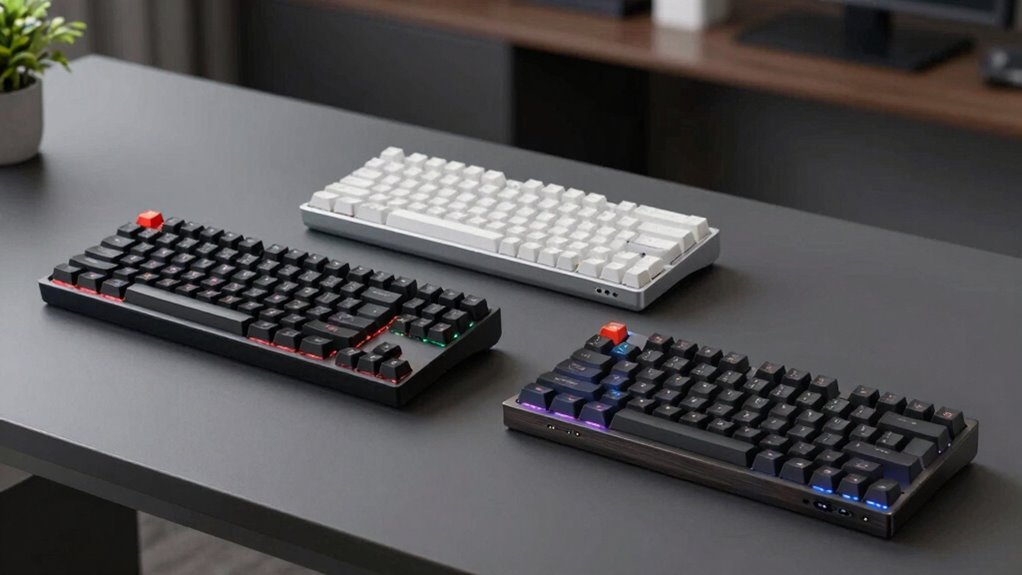

Choosing a quiet mechanical keyboard can be challenging, especially with so many options promising silence alongside performance. The Cherry KC 200 MX stands out for its smooth, reliable typing experience with Cherry’s renowned Silent Red switches—ideal for office environments where noise matters. Meanwhile, the SOLAKAKA KI99 Pro offers a versatile wireless setup with hot-swappable switches and customizable RGB lighting, perfect for those who want flexibility and personalization. On the premium end, the Logitech MX Mechanical balances quiet tactility with ergonomic features and multi-device support, making it a favorite for professionals. However, each has tradeoffs: some lack wireless options, others focus on customization at a higher price point. This roundup will help you identify which model aligns best with your needs, whether for work, gaming, or multi-device productivity.

Prime made for students and young adults
- Fast, free delivery for dorm and study essentials
- Prime Video and Amazon Music included
- Member-only deals
Key Takeaways
- The Cherry KC 200 MX offers a straightforward, durable wired experience with reliable silent switches, best for office users seeking simplicity.
- The SOLAKAKA KI99 Pro provides excellent customization, multi-connection modes, and hot-swappable switches, suited for tech-savvy users and gamers.
- The Logitech MX Mechanical combines quiet switches with ergonomic design and multi-device support, ideal for professional use with a focus on comfort.
- All options feature some form of RGB lighting or customization, but tradeoffs include connectivity limitations or higher costs for premium features.
- Your choice should depend on priorities like wired vs. wireless, customization, or ergonomic features, with all options prioritizing quieter typing.
| Cherry KC 200 MX Wired Mechanical Office Keyboard with Silent Red Switches |  | Best Overall Wired Quiet Mechanical Keyboard | Switch Type: Cherry MX2A Silent Red | Connectivity: Wired | Key Features: Full N-key rollover, anti-ghosting, white status LEDs, dedicated function keys | VIEW ON AMAZON | See Our Full Breakdown |
| SOLAKAKA KI99 Pro Wireless Mechanical Keyboard with RGB Backlit and Hot Swappable Switches |  | Best Wireless Customization and Versatility | Connection Modes: Bluetooth 5.0, 2.4G, Type-C | Battery Capacity: 10,000mAh | Layout: 96% | VIEW ON AMAZON | See Our Full Breakdown |
| SOLAKAKA A75 Wireless Gaming Keyboard with Multifunction Knob, RGB Backlit, Hot-Swappable, 75% Mechanical Layout, Crystal Keycaps |  | Best Compact Multi-Device Wireless Keyboard | Connectivity: Tri-mode (2.4GHz, BT5.0, USB-C) | Number of Keys: 81 | Backlight: RGB with 17 effects | VIEW ON AMAZON | See Our Full Breakdown |
| Logitech MX Mechanical Wireless Illuminated Keyboard Graphite |  | Best Ergonomic Wireless Quiet Keyboard for Professionals | Weight: 29.2 oz (828 g) | Dimensions: 1.02 x 17.08 x 5.18 in | Battery: Rechargeable Li-Po 1500 mAh | VIEW ON AMAZON | See Our Full Breakdown |
| Aula F99 Pro Wireless Silent Mechanical Office Keyboard with Knob and Num Pad |  | Best Full-Feature Wireless Quiet Keyboard with Numpad | Connection Modes: Bluetooth 5.0, 2.4G, USB-C | Number of Devices Supported: Up to 5 | Switch Type: Hot-swappable silent linear | VIEW ON AMAZON | See Our Full Breakdown |
| quiet mechanical keyboard | Switch Type | Connectivity | Battery Capacity | Layout |
|---|---|---|---|---|
| Cherry KC 200 MX Wired Mechani | Cherry MX2A Silent Red | Wired | — | — |
| SOLAKAKA KI99 Pro Wireless Mec | Silent, hot-swappable (3/5-pin) | — | 10,000mAh | 96% |
| SOLAKAKA A75 Wireless Gaming K | — | Tri-mode (2.4GHz, BT5.0, USB-C) | 4000mAh | 75% |
| Logitech MX Mechanical Wireles | Tactile Quiet | Bluetooth Low Energy, Logi Bolt receiver | — | — |
| Aula F99 Pro Wireless Silent M | Hot-swappable silent linear | — | 8000mAh | 96% with arrow keys and numpad |
More Details on Our Top Picks
Cherry KC 200 MX Wired Mechanical Office Keyboard with Silent Red Switches
The Cherry KC 200 MX stands out for its reliable, smooth typing thanks to Cherry’s renowned Silent Red switches, which significantly reduce noise compared to standard mechanical switches. Its sturdy anodized metal plate and abrasion-resistant keycaps promise durability for daily use. While the wired connection ensures stable performance, it limits flexibility, and the design remains quite plain—lacking the flair some users might prefer. Compared to wireless options, it offers less versatility but excels in environments where a wired setup is acceptable and noise reduction is critical. This model makes the most sense for office workers or anyone prioritizing a straightforward, no-fuss quiet typing experience.
Pros:- Quiet and smooth typing experience
- Durable, abrasion-resistant keycaps
- Includes dedicated function keys
- Full N-key rollover and anti-ghosting
Cons:- Limited switch options (only Silent Red)
- No wireless support
- Plain design
Best for: Office workers or users needing a reliable, quiet wired keyboard
Not ideal for: Users seeking wireless connectivity or gaming features
- Switch Type:Cherry MX2A Silent Red
- Connectivity:Wired
- Key Features:Full N-key rollover, anti-ghosting, white status LEDs, dedicated function keys
- Material:Anodized metal plate
- Keycap Material:Laser-etched, abrasion-resistant
Our verdict“A dependable wired choice for quiet, everyday typing that emphasizes durability and simplicity.”
SOLAKAKA KI99 Pro Wireless Mechanical Keyboard with RGB Backlit and Hot Swappable Switches
The SOLAKAKA KI99 Pro offers a compact 96% layout with wireless flexibility via Bluetooth 5.0, 2.4G, and USB-C connections. Its hot-swappable switches allow users to easily customize the tactile feel, and the quiet, gasket-structured switches make it suitable for gaming and office use alike. The full RGB backlighting, with 16.8 million colors, adds a vibrant aesthetic, although it requires software for full customization, which might be daunting for beginners. Its long battery life and multi-connection modes make it ideal for users who value flexibility and personalized setups. However, those new to mechanical keyboards or seeking plug-and-play simplicity may find setup overly complex. Despite this, it’s an excellent pick for tech enthusiasts seeking quiet, customizable wireless performance.
Pros:- Supports multiple connection modes
- Hot-swappable switches for easy customization
- Long-lasting 10,000mAh battery
- Compact 96% layout saves space
Cons:- Requires software for full RGB and macro customization
- Setup can be complex for some users
- Some may find the control knob unnecessary
Best for: Tech-savvy users needing wireless, customizable, quiet switches
Not ideal for: Beginners who prefer plug-and-play or minimal setup
- Connection Modes:Bluetooth 5.0, 2.4G, Type-C
- Battery Capacity:10,000mAh
- Layout:96%
- Switch Type:Silent, hot-swappable (3/5-pin)
- Lighting:Full RGB with side light bars
- Additional Features:Control knob for volume/media/lighting
Our verdict“A versatile wireless keyboard perfect for customization lovers who prioritize quiet operation and space-saving design.”
SOLAKAKA A75 Wireless Gaming Keyboard with Multifunction Knob, RGB Backlit, Hot-Swappable, 75% Mechanical Layout, Crystal Keycaps
The SOLAKAKA A75 combines sleek design with multi-device connectivity, supporting tri-mode connections—Bluetooth 5.0, 2.4G, and USB-C. Its hot-swappable linear switches and vibrant RGB lighting with 17 effects cater to gamers and productivity users alike. The crystal keycaps add a unique aesthetic, and the compact 75% layout makes it highly space-efficient. However, the battery life can be affected by extensive RGB use, and some users might find the need for driver customization a hurdle. Still, this model excels for users who want a flexible, multi-platform keyboard with quiet, smooth switches and a stylish look. It’s particularly suited for space-conscious setups and multi-device workflows.
Pros:- Supports tri-mode connectivity
- Hot-swappable linear switches
- Vibrant RGB with effects
- Compact 75% layout
Cons:- Battery life can vary with RGB usage
- Requires driver setup for full customization
- Limited switch types (linear only)
Best for: Gamers and multi-device users seeking compact, quiet wireless performance
Not ideal for: Users who prefer full-size layouts or extensive RGB customization without technical setup
- Connectivity:Tri-mode (2.4GHz, BT5.0, USB-C)
- Number of Keys:81
- Backlight:RGB with 17 effects
- Battery Capacity:4000mAh
- Layout:75%
- Compatibility:Windows, Mac, iOS
Our verdict“An elegant, space-saving wireless option perfect for multi-device multitasking with quiet switches.”
Logitech MX Mechanical Wireless Illuminated Keyboard Graphite
The Logitech MX Mechanical balances quiet tactile feedback with smart backlit illumination that adjusts to ambient light. Its robust design incorporates a rechargeable battery that lasts for weeks, and multi-device support allows seamless switching among up to three computers or tablets. The tactile quiet switches provide a satisfying typing experience without the noise typical of mechanical keyboards. While it doesn’t support Logitech Unifying technology, its ergonomic shape and smart lighting make it a favorite for office professionals and long-term users. However, it requires Logi Options+ software for full customization, and some might prefer a more traditional, full-size layout. Still, it offers a refined combination of comfort, silence, and connectivity for demanding users.
Pros:- Quiet, tactile switches with satisfying feedback
- Smart backlit illumination adjusts automatically
- Long battery life
- Supports multiple devices with easy switching
Cons:- Requires software for full customization
- No Logitech Unifying support
- Full-size design may be bulky for some setups
Best for: Professionals needing a quiet, ergonomic, multi-device keyboard
Not ideal for: Gamers or users seeking dedicated gaming features or wireless options beyond Bluetooth
- Weight:29.2 oz (828 g)
- Dimensions:1.02 x 17.08 x 5.18 in
- Battery:Rechargeable Li-Po 1500 mAh
- Connectivity:Bluetooth Low Energy, Logi Bolt receiver
- Switch Type:Tactile Quiet
- Material:Includes 45% post-consumer recycled plastic
Our verdict“A refined, ergonomic wireless keyboard combining quiet typing with advanced multi-device features, ideal for professionals.”
Aula F99 Pro Wireless Silent Mechanical Office Keyboard with Knob and Num Pad
The Aula F99 Pro offers a comprehensive wireless setup supporting Bluetooth 5.0, 2.4G, and USB-C wired connections. Its hot-swappable silent linear switches and PBT keycaps deliver a durable, quiet typing experience. The inclusion of a numpad, multifunction knob, and macro recording makes it a versatile choice for work, gaming, and study. The extensive battery capacity of 8000mAh supports long hours of use, though setup can be intricate, and the advanced features might be overkill for casual users. This model is best suited for users who need a full-sized, multi-device, quiet keyboard that can handle demanding productivity tasks along with gaming or multimedia control, all while maintaining a sleek aesthetic.
Pros:- Supports multiple connections and device switching
- Silent, hot-swappable switches
- Includes numpad and macro recording
- Long-lasting rechargeable battery
Cons:- Complex setup process
- Premium price point
- Features may be excessive for basic needs
Best for: Power users needing a full-featured, multi-device, quiet wireless keyboard
Not ideal for: Beginners or users seeking simple plug-and-play solutions
- Connection Modes:Bluetooth 5.0, 2.4G, USB-C
- Number of Devices Supported:Up to 5
- Switch Type:Hot-swappable silent linear
- Backlight:RGB with 16 effects
- Battery Capacity:8000mAh
- Layout:96% with arrow keys and numpad
Our verdict“A highly capable, feature-rich wireless keyboard for power users who demand quiet, versatile, multi-device operation.”

How We Picked
Our selection process focused on the most relevant features for a quiet mechanical keyboard, emphasizing sound reduction, build quality, and versatility. We prioritized products that explicitly highlight silent switches or noise-reducing structures, while also considering connection options, customization features, and overall durability. To ensure practical value, we balanced performance with price, aiming for a variety of roles—from basic office use to gaming and multi-device setups. Each keyboard was evaluated for pros, cons, and how well it aligns with specific user needs, ensuring every choice is meaningful and tailored to a quiet typing experience.
| quiet mechanical keyboard | Switch Type | Connectivity |
|---|---|---|
| Cherry KC 200 MX Wired Mechani | Cherry MX2A Silent Red | Wired |
| SOLAKAKA KI99 Pro Wireless Mec | Silent, hot-swappable (3/5-pin) | — |
| SOLAKAKA A75 Wireless Gaming K | — | Tri-mode (2.4GHz, BT5.0, USB-C) |
| Logitech MX Mechanical Wireles | Tactile Quiet | Bluetooth Low Energy, Logi Bolt receiver |
| Aula F99 Pro Wireless Silent M | Hot-swappable silent linear | — |
Factors to Consider When Choosing Quiet Mechanical Keyboard
Choosing the right quiet mechanical keyboard involves balancing noise reduction with features like connectivity, customization, and layout. Your ideal choice depends on your primary use—whether for office work, gaming, or multi-device workflows—and your preferences for wired or wireless setups. Consider the type of switches, as some offer better noise dampening, while others focus on tactile feedback or customization options. Also, evaluate additional features such as backlighting, macro support, and size. This guide will help clarify these factors to match your needs with the best quiet keyboard available.Switch Type and Noise Levels
The core of a quiet mechanical keyboard is its switch. Silent switches like Cherry MX Silent Red or linear options with damping structures significantly reduce noise during typing or gaming. Mechanical switches with a tactile bump tend to generate more sound, so prioritize linear or specially designed silent switches if noise is a concern. The choice impacts not just noise but also feel and response, which can influence your overall typing experience.
Connectivity Options
Deciding between wired and wireless setups depends on your workspace and mobility needs. Wired keyboards often deliver more reliable performance with no latency, making them ideal for office environments. Wireless models provide greater flexibility and a cleaner desk, especially if they support multiple connection modes like Bluetooth and 2.4G. Keep in mind that wireless keyboards may have limited battery life or require software for full features, which can be a tradeoff for convenience.
Layout and Size
Full-size keyboards include a numpad and are suitable for data entry or extended work sessions, but they take up more space. Compact layouts like 75% or 96% save desk real estate and are popular among gamers and minimalists, though they might sacrifice some dedicated keys. Multi-device support and features like macro keys or multifunction knobs are more common in higher-end models, adding versatility but also complexity. Your workspace and workflow will determine which layout best suits your needs.
Additional Features and Customization
Backlighting, macro recording, and software customization enhance usability and aesthetics. RGB lighting can be purely decorative or functional, such as indicating device status or notifications. Hot-swappable switches allow easy customization without soldering, making it simple to tailor the feel and noise levels over time. Consider how much you value these extras versus simplicity and ease of use, especially if you’re new to mechanical keyboards.
Frequently Asked Questions
Are mechanical keyboards really quieter than membrane keyboards?
Mechanical keyboards can be quieter than membrane keyboards if they use silent or damped switches designed specifically for noise reduction. Switches like Cherry MX Silent Red or linear switches with damping structures are engineered to minimize sound during key presses. However, traditional mechanical switches tend to produce more noise due to their mechanical contact points, so choosing the right type is essential if noise level is a priority.
What features should I look for in a quiet mechanical keyboard for office use?
For office environments, prioritize switches labeled as silent or quiet, such as Cherry MX Silent Red or similar. A sturdy build with noise-dampening features, like gasket structures, can further reduce sound. Wireless connectivity can help reduce cable clutter, and a compact layout can save desk space. Ergonomics and durability are also key, so look for models with comfortable keycaps and solid construction that can withstand daily use.
Can I customize the sound and feel of my mechanical keyboard?
Yes, many modern mechanical keyboards offer customization options, especially those with hot-swappable switches. You can choose switches with different actuation forces, tactile feedback, or damping features to tailor the feel and noise level. Additionally, software support for RGB lighting and macros allows further personalization, though some setups may require technical knowledge to optimize effectively.
Are wireless mechanical keyboards as reliable as wired ones?
Wireless mechanical keyboards can match the reliability of wired models if they use high-quality Bluetooth or 2.4G connections. They eliminate cable clutter and add flexibility, but may have slight latency or battery life considerations. Choosing a model with a good power management system and multiple connection modes helps ensure consistent performance, especially for gaming or critical typing tasks.
How important are keycap materials in noise reduction?
Keycap materials like PBT tend to produce less noise than ABS because they have a more solid feel and less flex when pressed. PBT keycaps are also more resistant to wear and shine over time, maintaining their sound and feel longer. For quieter typing, investing in high-quality keycaps along with silent switches can provide a noticeable reduction in overall noise.
Evergreen bestsellers Picks
bestsellers
As an affiliate, we earn on qualifying purchases.