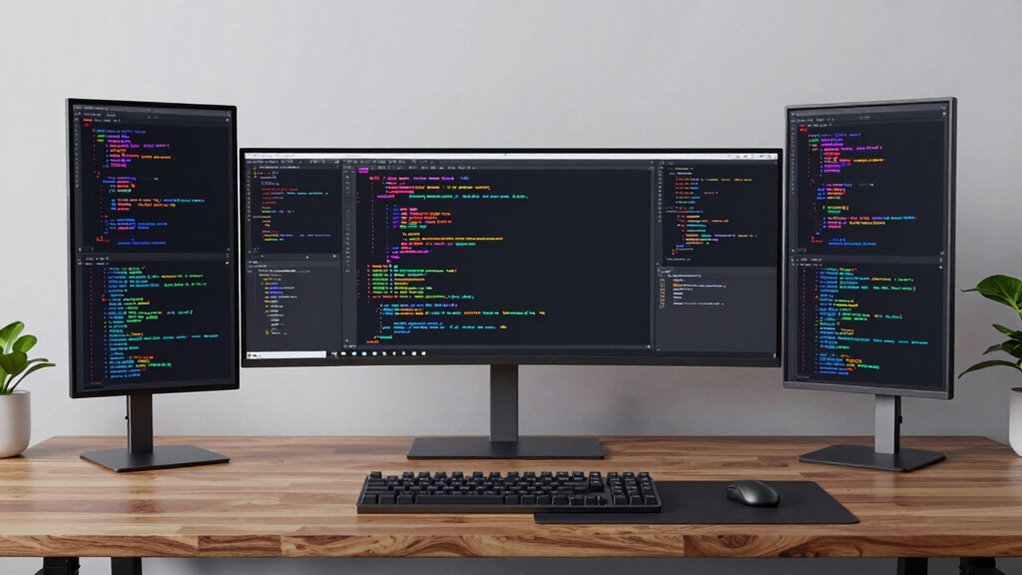

Finding the right monitor for coding involves balancing screen size, resolution, refresh rate, and eye comfort. The Dell 34 Monitor S3425DW stands out as the best overall for its large ultra-wide display and high resolution, perfect for multitasking. The BenQ RD280U offers incredible 4K clarity for detailed code review, while the Sceptre 24-inch Prime Gaming Monitor provides a budget-friendly option with high refresh rates for smooth scrolling. These options highlight the key tradeoffs: larger screens and higher resolutions increase productivity but often come at a higher cost. Continue reading for a detailed breakdown of the best monitors for your coding setup.

Prime made for students and young adults
- Fast, free delivery for dorm and study essentials
- Prime Video and Amazon Music included
- Member-only deals
Key Takeaways
- Ultra-wide monitors like the Dell S3425DW enhance multitasking and reduce window switching.
- Higher resolutions, such as 4K, improve code clarity but may require more powerful hardware.
- Refresh rates above 100Hz are beneficial for smooth scrolling but are less critical for static coding tasks.
- Eye-care features like flicker-free and blue light reduction help reduce fatigue during long coding sessions.
- Budget options can still offer high-quality features, but compromises often include resolution or build quality.
| Dell 34 Monitor S3425DW, WQHD VA, 120Hz, FreeSync Premium, Eye Comfort |  | Best Overall for Versatile Productivity and Entertainment | Display Size: 34 inches | Resolution: 3440×1440 | Refresh Rate: 120Hz | VIEW ON AMAZON | See Our Full Breakdown |
| Samsung 27″ Essential S3 (S36GD) Series FHD Curved Computer Monitor |  | Best for Budget-Friendly Curved Experience | Screen Size: 27 inches | Display Type: FHD | Curve Radius: 1800R | VIEW ON AMAZON | See Our Full Breakdown |
| Philips 27″ Full HD VA Monitor 100Hz with Eye Care, 271V8LB |  | Best for Vivid Visuals and Eye Care in a Budget-Friendly Package | Display Size: 27 inches | Resolution: 1920×1080 | Refresh Rate: 100Hz | VIEW ON AMAZON | See Our Full Breakdown |
| Sceptre 24-inch Prime Gaming Monitor with 165Hz, DisplayPort x2, HDMI x2, Built-in Speakers |  | Best for Gaming and Multimedia with Compact Size | Size: 24 inches | Refresh Rate: 165Hz | Response Time: 1ms | VIEW ON AMAZON | See Our Full Breakdown |
| Sceptre 27-inch Curved Prime Gaming Monitor with 180Hz Refresh Rate and Built-in Speakers |  | Best for Curved Gaming with Vibrant Colors | Size: 27 inches | Curvature: 1500R | Refresh Rate: 180Hz | VIEW ON AMAZON | See Our Full Breakdown |
| KTC 24 Inch QHD IPS Computer Monitor, 100Hz Zero-Frame 2K for Gaming and Office |  | Best Overall for Versatile Office and Gaming Use | Size: 24 inches | Resolution: QHD 1440p | Refresh Rate: 100Hz | VIEW ON AMAZON | See Our Full Breakdown |
| BenQ RD280U 28.2” 4K Programming Monitor with Nano Matte Panel and Eye-Care Technology |  | Best for Programmers Needing High Resolution and Long-Term Comfort | Display Size: 28.2 inches | Resolution: 3840 x 2560 (4K UHD) | Aspect Ratio: 3:2 | VIEW ON AMAZON | See Our Full Breakdown |
| KTC 24 Inch QHD 100Hz IPS Computer Monitor |  | Best Value for Color-Rich, Smooth 2K Display | Size: 24 inches | Resolution: 1440P (2K) | Refresh Rate: 100Hz | VIEW ON AMAZON | See Our Full Breakdown |
| Dell 27 Plus QHD Monitor – S2725DSM – 27-inch 2560×1440, 144Hz, 1ms, IPS, AMD FreeSync, Speakers, Adjustable |  | Best for Fast-Paced Work and Extended Use | Size: 27 inches | Resolution: 2560 x 1440 | Refresh Rate: 144Hz | VIEW ON AMAZON | See Our Full Breakdown |
| BenQ Programming Monitor RD280UG 28.2″ 4K+ 120Hz 3:2 Aspect Ratio Nano Matte Panel |  | Best for Vertical Space and Extended Coding Sessions | Size: 28.2 inches | Resolution: 4K+ | Refresh Rate: 120Hz | VIEW ON AMAZON | See Our Full Breakdown |
| BenQ RD320U 32-Inch 4K UHD Programming Monitor with Nano Matte Panel and Eye-Care Technology |  | Best Overall for Professional Programmers and Content Creators | Display Size: 32 inches | Resolution: 3840 x 2160 pixels | Contrast Ratio: 2000:1 | VIEW ON AMAZON | See Our Full Breakdown |
| Samsung 34″ ViewFinity S50GC Series Ultra-WQHD Monitor, 100Hz, HDR10, AMD FreeSync, Black |  | Best for Multitasking and Creative Work in an Ultra-Wide Format | Screen Size: 34 inches | Resolution: 3440 x 1440 (Ultra WQHD) | Refresh Rate: 100Hz | VIEW ON AMAZON | See Our Full Breakdown |
| monitor for coding | Refresh Rate | Resolution | Size |
|---|---|---|---|
| Dell 34 Monitor S3425DW | 120Hz | 3440×1440 | — |
| Samsung 27" Essential S3 | 100Hz | — | — |
| Philips 27" Full HD VA Monitor | 100Hz | 1920×1080 | — |
| Sceptre 24-inch Prime Gaming M | 165Hz | — | 24 inches |
| Sceptre 27-inch Curved Prime G | 180Hz | — | 27 inches |
| KTC 24 Inch QHD IPS Computer M | 100Hz | QHD 1440p | 24 inches |
| BenQ RD280U 28.2” 4K Programmi | 60 Hz | 3840 x 2560 (4K UHD) | — |
| KTC 24 Inch QHD 100Hz IPS Comp | 100Hz | 1440P (2K) | 24 inches |
| Dell 27 Plus QHD Monitor | 144Hz | 2560 x 1440 | 27 inches |
| BenQ Programming Monitor RD280 | 120Hz | 4K+ | 28.2 inches |
| BenQ RD320U 32-Inch 4K UHD Pro | 60 Hz | 3840 x 2160 pixels | — |
| Samsung 34" ViewFinity S50GC S | 100Hz | 3440 x 1440 (Ultra WQHD) | — |
More Details on Our Top Picks
Dell 34 Monitor S3425DW, WQHD VA, 120Hz, FreeSync Premium, Eye Comfort
The Dell S3425DW stands out as a well-rounded choice for those who need a monitor that balances work and leisure. Its 34-inch curved VA panel with 3440×1440 resolution delivers immersive, wide-screen visuals that excel in multitasking—more expansive than the 27-inch options like Samsung S36GD, which might feel cramped for extended coding sessions. The 120Hz refresh rate and FreeSync Premium ensure smooth, tear-free visuals during multimedia tasks or light gaming, making it more versatile than standard 60Hz monitors. Eye comfort features, including blue light filtering and flicker-free technology, help reduce strain during long coding marathons. Plus, the USB-C port with 65W power delivery simplifies connectivity for modern laptops. The main tradeoffs involve its sizable footprint requiring ample desk space and a premium price typical for high-end screens. Overall, this monitor suits developers who want a large, vibrant display capable of handling both coding and entertainment seamlessly.
Pros:- Vivid, true-to-life colors with 99% sRGB and 95% DCI-P3 coverage
- Smooth visuals with 120Hz refresh rate and FreeSync Premium support
- Eye comfort features reduce blue light emissions for all-day use
- Easy connectivity via USB-C with 65W power delivery
Cons:- Large size may be unwieldy on small desks
- Higher price point might be prohibitive for some users
- Limited details about built-in speakers’ quality
Best for: Developers and content creators who value a large, color-accurate display for multitasking and media consumption
Not ideal for: Users with limited desk space or those on a tight budget, as its size and price are significant considerations
- Display Size:34 inches
- Resolution:3440×1440
- Refresh Rate:120Hz
- Response Time:0.03ms
- Contrast Ratio:3000:1
- Panel Type:VA
Our verdict“This monitor is best suited for users who need a large, color-accurate display that balances productivity with entertainment capabilities.”
Samsung 27″ Essential S3 (S36GD) Series FHD Curved Computer Monitor
The Samsung Essential S3 S36GD offers an approachable 27-inch curved display that enhances immersion without overwhelming your workspace. Compared to the larger Dell S3425DW, this monitor’s smaller size is more manageable for tight desks but sacrifices some real estate for multitasking. Its 1800R curvature helps create an engaging viewing experience, especially for gaming or casual coding sessions. The 100Hz refresh rate, once manually adjusted from default, helps minimize lag, outperforming standard monitors limited to 60Hz. Its eye comfort technology reduces strain during long hours of use, similar to the Philips 271V8LB but at a more budget-friendly price. However, the lack of advanced connectivity options and unclear build quality may limit its appeal for intensive professional use. This monitor makes sense for casual coders or those prioritizing an affordable curved display.
Pros:- Immersive 1800R curvature enhances viewing experience
- High refresh rate (100Hz) reduces motion blur with manual setup
- Eye comfort technology minimizes eye strain
- Compact size fits small or cluttered desks
Cons:- Default 60Hz setting requires manual adjustment for optimal performance
- Limited connectivity options hinder multi-device setup
- Build quality details are sparse, raising durability questions
Best for: Casual developers or users seeking an affordable, curved display for daily coding and media consumption
Not ideal for: Power users or professionals requiring advanced connectivity and larger screen real estate
- Screen Size:27 inches
- Display Type:FHD
- Curve Radius:1800R
- Refresh Rate:100Hz
- Connectivity:HDMI, D-sub
- Eye Comfort Technology:Yes
Our verdict“A suitable choice for budget-conscious users who want a curved screen that enhances immersion without breaking the bank.”
Philips 27″ Full HD VA Monitor 100Hz with Eye Care, 271V8LB
The Philips 271V8LB provides a vibrant 27-inch Full HD experience with wide viewing angles, making it a solid choice for those who value color accuracy. Its 100Hz refresh rate ensures smoother motion than standard 60Hz models, which benefits extended coding sessions. Eye care features like BlueLight Mode and Flicker-Free technology help reduce fatigue, comparable to the Samsung S36GD but with a focus on affordability. The sleek, bezel-free design makes it easy to integrate into multi-monitor setups. Yet, its 1080p resolution limits sharpness compared to higher-end 4K options, and brightness levels may fall short in very bright environments. It lacks built-in speakers, which might be a drawback for some users. This pick is ideal for budget-conscious coders who prioritize vivid visuals and eye comfort.
Pros:- Vivid Full HD display with wide viewing angles
- High refresh rate (100Hz) for smooth visuals
- Eye care features reduce eye strain
- Sleek, bezel-free design suitable for multi-monitor setups
Cons:- Limited to 1080p resolution, less sharp for detailed work
- Brightness may be insufficient in bright rooms
- No built-in speakers for audio needs
Best for: Beginners or budget-conscious developers seeking a vibrant, comfortable display for daily coding
Not ideal for: Power users or those requiring 4K resolution or integrated audio
- Display Size:27 inches
- Resolution:1920×1080
- Refresh Rate:100Hz
- Contrast Ratio:3000:1
- Panel Type:VA
- Eye Care Technology:BlueLight Mode, Flicker-Free
Our verdict“A budget-friendly monitor that balances vivid visuals with eye comfort, ideal for entry-level or casual coding environments.”
Sceptre 24-inch Prime Gaming Monitor with 165Hz, DisplayPort x2, HDMI x2, Built-in Speakers
The Sceptre 24-inch Prime Gaming Monitor offers impressive gaming specs in a compact form factor, making it appealing for users who want a versatile monitor for both work and play. Its 165Hz refresh rate combined with a 1ms response time provides crisp, tear-free visuals during fast-paced coding or gaming. This makes it stand out compared to larger monitors with lower refresh rates like the Samsung S36GD, especially for those who prefer a smaller setup or have limited desk space. Multiple ports including DisplayPort and HDMI, along with built-in speakers, add convenience. However, its small size may not suit users who need extensive screen real estate, and its gaming focus might limit its appeal for purely professional coding tasks. This monitor is ideal for gamers or multimedia enthusiasts who code in short sessions and want high performance in a compact package.
Pros:- High 165Hz refresh rate and 1ms response time for smooth motion
- Multiple connectivity options including DisplayPort and HDMI
- Built-in speakers and eye-care technology
- Compact 24-inch size fits small desks
Cons:- Limited to 24 inches, less suitable for extensive multitasking
- Potentially higher price due to gaming features
- Lack of ergonomic stand adjustments
Best for: Casual gamers or developers who want a compact, high-refresh-rate monitor for multitasking and entertainment
Not ideal for: Professional developers requiring large screens or extensive workspace for complex multitasking
- Size:24 inches
- Refresh Rate:165Hz
- Response Time:1ms
- Color Gamut:94% sRGB
- Connectivity:2 HDMI, 2 DisplayPort
- Built-in Speakers:Yes
Our verdict“A great choice for gamers or users wanting a fast, compact monitor that handles both coding and entertainment with ease.”
Sceptre 27-inch Curved Prime Gaming Monitor with 180Hz Refresh Rate and Built-in Speakers
The Sceptre 27-inch curved monitor with 1500R radius offers a compelling mix of high refresh rate and vibrant colors, making it suitable for gaming and multimedia tasks. Its 180Hz refresh rate and 1ms response time ensure extremely smooth visuals, outperforming many non-gaming monitors like the Philips 271V8LB in responsiveness. The 100% sRGB coverage guarantees vivid, accurate colors, appealing for multimedia editing or immersive gaming. The curved design enhances engagement, especially in multi-monitor setups. However, the built-in speakers may not satisfy audiophiles, and at 27 inches, it might feel small for users who prefer larger screens for coding or detailed work. Its gaming focus makes it a strong choice for enthusiasts who want a balance between performance and visual quality, but less so for pure productivity needs.
Pros:- 180Hz refresh rate and 1ms response time for ultra-smooth visuals
- Vibrant, 100% sRGB color coverage
- 1500R curvature for immersive viewing
- Built-in speakers for convenience
Cons:- Built-in speakers may lack quality for serious audio needs
- Limited to 27 inches, which might be small for some users
- No ergonomic stand adjustments specified
Best for: Gamers and multimedia enthusiasts seeking a curved display with high refresh rates for immersive experiences
Not ideal for: Developers needing larger screens or professional-grade color accuracy for extensive coding
- Size:27 inches
- Curvature:1500R
- Refresh Rate:180Hz
- Response Time:1ms
- Color Gamut:100% sRGB
- Connectivity:2 HDMI, 2 DisplayPort
Our verdict“An excellent pick for gamers or multimedia users wanting a curved display with outstanding responsiveness and vibrant colors.”
KTC 24 Inch QHD IPS Computer Monitor, 100Hz Zero-Frame 2K for Gaming and Office
This monitor excels for users who need a balanced mix of visual clarity and smooth performance. Its QHD IPS display delivers vibrant, crisp images, making it suitable for detailed coding and media consumption. The 100Hz refresh rate and FreeSync/G-Sync compatibility make it a good choice for occasional gaming, setting it apart from standard office monitors. Compared to the Dell 27 Plus, it offers a smaller footprint but lacks extensive ergonomic adjustments like height adjustment, which could affect long-term comfort. The borderless design enhances workspace efficiency, yet the limited tilt range and absence of built-in speakers are notable tradeoffs. This pick makes the most sense for those who want a versatile display that handles both work and play without fuss.
Pros:- Vivid, accurate colors with 99% sRGB coverage
- Smooth performance with 100Hz refresh rate and adaptive sync support
- Multiple connectivity options including HDMI, DisplayPort, and VESA compatibility
- Eye protection features reduce fatigue during long use
Cons:- Limited tilt adjustment reduces ergonomic flexibility
- No built-in speakers or height adjustment
Best for: Developers or office workers who also enjoy casual gaming and need a compact, vibrant display
Not ideal for: Users requiring extensive ergonomic adjustments or built-in audio for long hours without external speakers
- Size:24 inches
- Resolution:QHD 1440p
- Refresh Rate:100Hz
- Display Technology:IPS
- HDR:HDR10
- Color Coverage:99% sRGB
Our verdict“This monitor is ideal for users seeking a versatile, color-accurate display that balances productivity and gaming in a compact form.”
BenQ RD280U 28.2” 4K Programming Monitor with Nano Matte Panel and Eye-Care Technology
The BenQ RD280U is tailored for programmers who prioritize clarity and eye comfort over fast-paced gaming. Its 4K UHD resolution provides exceptional detail for complex coding environments, outclassing the 1440p options like the KTC 24-inch. The Nano Matte panel minimizes reflections, reducing eye strain during long sessions, while the specialized coding modes enhance readability. With USB-C and KVM support, it offers flexible connectivity, but the 60Hz refresh rate limits its suitability for gaming or fast-paced tasks. Its large size demands ample desk space, and the price may be a consideration. Compared to the Dell 27 Plus, it sacrifices some versatility for a focus on comfort and detailed visuals, making it ideal for dedicated coding work.
Pros:- Sharp 4K resolution enhances detailed coding and design work
- Nano Matte surface reduces glare and reflections effectively
- Multiple connectivity options including USB-C and KVM support
- Designed with long-term eye comfort in mind
Cons:- Limited to 60Hz, unsuitable for fast-paced gaming
- Large footprint may be impractical for small desks
Best for: Professional programmers or designers needing high detail and eye comfort for extended coding sessions
Not ideal for: Gamers or users seeking high refresh rates for fast action or casual users on limited desk space
- Display Size:28.2 inches
- Resolution:3840 x 2560 (4K UHD)
- Aspect Ratio:3:2
- Contrast Ratio:1200:1
- Refresh Rate:60 Hz
- Connectivity:HDMI, USB Type-C
Our verdict“This monitor is perfect for coders and designers who prioritize detailed visuals and eye comfort over gaming performance.”
KTC 24 Inch QHD 100Hz IPS Computer Monitor
This 24-inch model offers a compelling combination of image quality and affordability, making it a strong contender for general productivity and creative tasks. Its 1440p resolution delivers crisp visuals, comparable to the more premium options like the BenQ RD280U, but without the 4K detail. The 100Hz refresh rate provides smooth motion, beneficial for both casual gaming and fast scrolling during coding. Its wide 178° viewing angles and 99% sRGB coverage support accurate color work. However, it lacks mention of built-in speakers or extensive ergonomic adjustments, which could impact long hours of use. Compared to the Dell S2725DSM, it offers a similar refresh rate and color accuracy at a potentially lower price point, making it a balanced choice for those who want quality without extra bells and whistles.
Pros:- Sharp 2K resolution with vibrant, accurate colors
- Smooth 100Hz refresh rate supports casual gaming and scrolling
- Wide viewing angles and VESA mount compatibility
- Blue light filter for eye protection
Cons:- No built-in speakers or height adjustment
- Price and connectivity details are not specified
Best for: Budget-conscious developers or content creators who need a reliable, color-accurate display
Not ideal for: Users requiring extensive ergonomic features or integrated audio for prolonged use
- Size:24 inches
- Resolution:1440P (2K)
- Refresh Rate:100Hz
- Panel Type:IPS
- Color Coverage:99% sRGB
- VESA Compatible:Yes
Our verdict“This monitor offers excellent image clarity and smooth performance at a value-oriented price point, suitable for most coding needs.”
Dell 27 Plus QHD Monitor – S2725DSM – 27-inch 2560×1440, 144Hz, 1ms, IPS, AMD FreeSync, Speakers, Adjustable
The Dell S2725DSM stands out for users who need quick responsiveness and versatile ergonomics. Its 144Hz refresh rate and 1ms response time excel in fast motion scenarios, making it suitable for gaming and high-speed coding workflows. The IPS panel supplies vibrant, consistent visuals with 99% sRGB coverage, comparable to other options like the BenQ RD280U but with a more flexible stand that includes height, tilt, pivot, and swivel adjustments. The built-in speakers add convenience, although the limited port selection—only one HDMI and one DisplayPort—might restrict multi-device setup. Compared to the BenQ model, it offers more ergonomic flexibility but falls short on resolution, maintaining a 1440p display rather than 4K. It’s perfect for users balancing fast visuals with comfort during extended hours.
Pros:- Fast 144Hz refresh rate with 1ms response time for smooth motion
- Vivid IPS display with 99% sRGB coverage
- Fully adjustable stand for comfort during long sessions
- Built-in dual 3W speakers for added convenience
Cons:- Limited port options—only HDMI and DisplayPort
- No USB-C connectivity
Best for: Gamers, streamers, or fast-paced coders needing quick response times and ergonomic flexibility
Not ideal for: Those who prioritize ultra-high resolution or minimalistic setups without extensive stand adjustments
- Size:27 inches
- Resolution:2560 x 1440
- Refresh Rate:144Hz
- Response Time:1ms
- IPS:Yes
- Speakers:2 x 3W
Our verdict“This monitor is ideal for users who need high responsiveness combined with flexible ergonomics for extended use.”
BenQ Programming Monitor RD280UG 28.2″ 4K+ 120Hz 3:2 Aspect Ratio Nano Matte Panel
The BenQ RD280UG is designed specifically for programmers who need maximum vertical space and visual comfort. Its 3:2 aspect ratio provides more room for dual windows or long lines of code, surpassing traditional 16:9 screens. The 120Hz refresh rate ensures smooth cursor movement and navigation, comparable to gaming monitors but optimized for productivity. The Nano Matte panel and MoonHalo backlight work together to reduce reflections and eye strain, even during prolonged periods. Its advanced features, like coding-specific modes, make it a strong candidate over standard 4K monitors like the BenQ RD280U, but the lack of detailed connectivity info and higher price point could deter budget-conscious buyers. This monitor is best suited for dedicated programmers who value ergonomics and visual comfort above all else.
Pros:- Generous 3:2 aspect ratio maximizes vertical space for coding
- 120Hz refresh rate for smooth navigation
- Nano Matte surface reduces reflections effectively
- Specialized coding modes enhance readability
Cons:- Limited info on connectivity options
- Higher price may be prohibitive for some
Best for: Professional programmers and long-hour operators who prioritize vertical space and eye comfort
Not ideal for: Casual users or gamers seeking high refresh rates for fast action
- Size:28.2 inches
- Resolution:4K+
- Refresh Rate:120Hz
- Aspect Ratio:3:2
- Panel Type:Nano Matte
- Backlight:MoonHalo
Our verdict“This monitor offers an exceptional environment for programmers needing more vertical real estate and reduced eye strain.”
BenQ RD320U 32-Inch 4K UHD Programming Monitor with Nano Matte Panel and Eye-Care Technology
The BenQ RD320U stands out as the best overall choice for people who spend long hours coding or working with detailed visuals. Its 32-inch 4K UHD resolution delivers sharp, clear images, making reading code and viewing complex interfaces comfortable. The Nano Matte Panel significantly reduces reflections, which can be a game-changer in brightly lit environments, outperforming glossy screens that cause glare. Its advanced coding modes—including dark and light themes—improve readability, and eye-care tech minimizes strain during extended sessions. Compared with the Samsung 34″ ViewFinity S50GC, it offers a larger, more focused workspace with better contrast, but the limitation is its fixed stand setup and lack of built-in speakers. The 60Hz refresh rate isn’t ideal for fast-paced gaming, but that’s irrelevant for coding. Overall, it’s tailored to developers and multimedia professionals who prioritize clarity and comfort over gaming specs.
Pros:- Sharp 4K UHD resolution with high contrast for detailed visuals
- Nano Matte Panel reduces reflections for better viewing in bright environments
- Customizable coding modes enhance readability and focus
- Eye-care technology minimizes eye strain during long use
Cons:- Limited stand adjustability can affect ergonomic comfort
- No built-in speakers or extra ports available
- 60Hz refresh rate may not satisfy gamers or fast-action users
Best for: Professional programmers, video editors, and content creators who need a large, high-resolution display with reduced glare.
Not ideal for: Gamers or users seeking ultra-fast refresh rates or integrated audio, since it prioritizes visual clarity and eye comfort.
- Display Size:32 inches
- Resolution:3840 x 2160 pixels
- Contrast Ratio:2000:1
- Refresh Rate:60 Hz
- Display Type:LED LCD
- Connectivity:USB Type C
Our verdict“This monitor is ideal for professionals needing crisp visuals, reduced glare, and long-term comfort for coding and multimedia tasks.”
Samsung 34″ ViewFinity S50GC Series Ultra-WQHD Monitor, 100Hz, HDR10, AMD FreeSync, Black
The Samsung 34″ ViewFinity S50GC makes a compelling case for users who need expansive screen real estate, especially for multitasking, creative workflows, or detailed spreadsheets. Its 3440×1440 Ultra WQHD resolution provides a broader workspace compared to the BenQ RD320U, enabling seamless side-by-side app use. The HDR10 support enhances color vibrancy, making it suitable for creative professionals. Eye care features help reduce strain during long hours, and the borderless design adds to an immersive experience. However, at a higher price point, it may be less accessible for budget-conscious users. The 100Hz refresh rate is sufficient for most productivity tasks but falls short for competitive gaming, and the lack of built-in speakers could be a drawback for some. It’s a smart choice for those who value wide viewing angles and vibrant visuals but don’t need gaming-grade performance.
Pros:- Large ultra-wide 34-inch screen ideal for multitasking
- Vivid colors and HDR10 support for vibrant visuals
- Eye care features reduce fatigue during extended use
- Multiple input ports and picture-in-picture functionality enhance productivity
Cons:- Higher cost compared to standard-sized monitors
- Limited to 100Hz refresh rate, not suited for competitive gaming
- No built-in speakers, requiring external audio solutions
Best for: Creative professionals, designers, and multitaskers who benefit from a wide, high-resolution display with excellent color support.
Not ideal for: Serious gamers or users seeking a monitor with built-in audio or higher refresh rates for fast-paced gaming.
- Screen Size:34 inches
- Resolution:3440 x 1440 (Ultra WQHD)
- Refresh Rate:100Hz
- Response Time:5ms
- HDR:HDR10
- Inputs:2 x HDMI 2.2, 1 x DisplayPort 1.2
Our verdict“This monitor excels for users who need an expansive, colorful workspace for creative and multitasking needs without demanding high refresh rates or built-in audio.”

How We Picked
Our evaluation focused on performance, usability, build quality, and value. For coding, a monitor must provide sharp image quality and ample screen real estate, so resolution and size were prioritized. We also considered features that reduce eye strain, such as flicker-free technology and blue light filters, vital for long coding sessions. Refresh rate was examined mainly for smooth scrolling, but it was secondary to clarity and comfort. The rankings reflect a balance between these factors, with top picks excelling in overall productivity and ergonomic design, while budget options offer good value despite some compromises.Factors to Consider When Choosing Monitor For Coding
Choosing the right monitor for coding requires understanding several key factors that influence productivity and comfort. Beyond just size and resolution, considerations like color accuracy, eye care features, and connectivity can significantly impact your experience. It’s important to match your monitor’s specs with your actual coding needs and hardware capabilities, avoiding common pitfalls such as overspending on unnecessary features or choosing a screen that’s too small for detailed work.Screen Size and Resolution
Larger screens, especially ultra-wide models, provide more workspace for multiple windows and reduce the need for constant window switching. A resolution of 1440p (QHD) or higher is recommended for sharp text and detailed code review. Keep in mind that higher resolutions demand a more powerful graphics card, which might add to your overall setup cost. For most developers, a 27-inch monitor with at least 1440p strikes a good balance between workspace and performance requirements.
Color Accuracy and Panel Type
While color accuracy is less critical for coding than for design work, IPS panels tend to offer better viewing angles and more consistent colors, which reduce eye strain during long sessions. VA panels, like some in this roundup, often deliver higher contrast but can sometimes suffer from slower response times. Choosing a monitor with stable viewing angles and good contrast helps maintain clarity and reduces eye fatigue over extended periods.
Eye Comfort Features
Features like flicker-free backlighting and blue light filters are essential for sustained coding sessions. These reduce eye strain and fatigue, especially if you work long hours. Even budget models now include some of these features, but verifying their presence ensures your setup supports healthy habits. Avoid monitors with flickering screens or poor brightness uniformity that can cause discomfort over time.
Connectivity and Ergonomics
Good connectivity options—such as multiple HDMI, DisplayPort, or USB-C ports—allow flexibility with peripherals and docking stations. Ergonomic adjustments like tilt, swivel, and height adjustment are equally important for maintaining good posture and reducing strain. Investing in a monitor with these features can significantly improve your long-term comfort and productivity.
Price and Value
While high-end monitors offer excellent features, they also come at a premium. Consider how much you value features like 4K resolution, ultra-wide screens, or high refresh rates. For most coders, a well-balanced mid-range monitor provides great value without unnecessary extras. Be cautious of models that seem inexpensive but lack critical features like eye care or ergonomic options, which could lead to discomfort and reduced productivity over time.
Frequently Asked Questions
Is a 4K monitor necessary for coding?
A 4K monitor offers sharper text and more detailed visuals, which can enhance the coding experience, especially for complex projects. However, it also demands more powerful hardware and may introduce scaling issues on some operating systems. For most developers, a high-quality QHD (1440p) monitor provides a good balance of clarity and performance without the extra hardware requirements of 4K. Consider your hardware capabilities and whether the visual benefits justify the additional cost.
Should I prioritize refresh rate or resolution for coding?
For coding, resolution and screen size tend to matter more than refresh rate, as static text and code do not benefit significantly from higher refresh rates. A refresh rate above 60Hz provides smoother scrolling, but unless you also game or do video editing, it’s less critical. If you value a very smooth scrolling experience or do some light gaming, then a higher refresh rate (like 120Hz or more) could be worthwhile, but for most coding tasks, focus on resolution and eye comfort features.
Are ultra-wide monitors worth it for coding?
Ultra-wide monitors like the Dell S3425DW significantly increase your workspace, making it easier to view multiple files or applications simultaneously. They reduce the need to switch between tabs and improve workflow efficiency. However, they tend to be more expensive and require more desk space. If your work involves multitasking or you prefer a panoramic view, ultra-wide monitors are a worthwhile investment. Otherwise, a large standard monitor may suffice and be more budget-friendly.
How important are ergonomic features in a coding monitor?
Ergonomics play a critical role in long-term comfort, especially if you spend hours at your desk. Monitors with adjustable height, tilt, and swivel help you maintain proper posture, reducing neck and back strain. Even a high-resolution, feature-rich monitor can cause discomfort if it’s not positioned correctly. Prioritizing ergonomic adjustments in your monitor choice supports healthier working habits and boosts productivity over time.
Is built-in speakers necessary in a coding monitor?
Built-in speakers can be convenient for quick audio cues or video calls, but they usually don’t deliver high-quality sound. Most developers prefer dedicated speakers or headphones for better audio clarity during meetings or multimedia consumption. If space or simplicity is a priority, a monitor with built-in speakers can be a useful feature, but it shouldn’t be a deciding factor if audio quality is important for your workflow.
Conclusion
For general coding needs, the Dell 34 Monitor S3425DW offers an excellent balance of size, resolution, and eye comfort, making it the best overall choice. Budget-conscious developers will find value in the Sceptre 24-inch Prime Gaming Monitor, which provides high refresh rates and good clarity at a lower cost. Those seeking premium features and ultimate clarity should consider the BenQ RD280U or BenQ RD280UG for 4K resolution and excellent ergonomics. Beginners and casual coders might prioritize affordability and ergonomic comfort, while professionals working on complex, multitasking projects should opt for larger, high-resolution models. Use these insights to select a monitor that best supports your coding style and workspace.
Halloween Picks
halloween
As an affiliate, we earn on qualifying purchases.