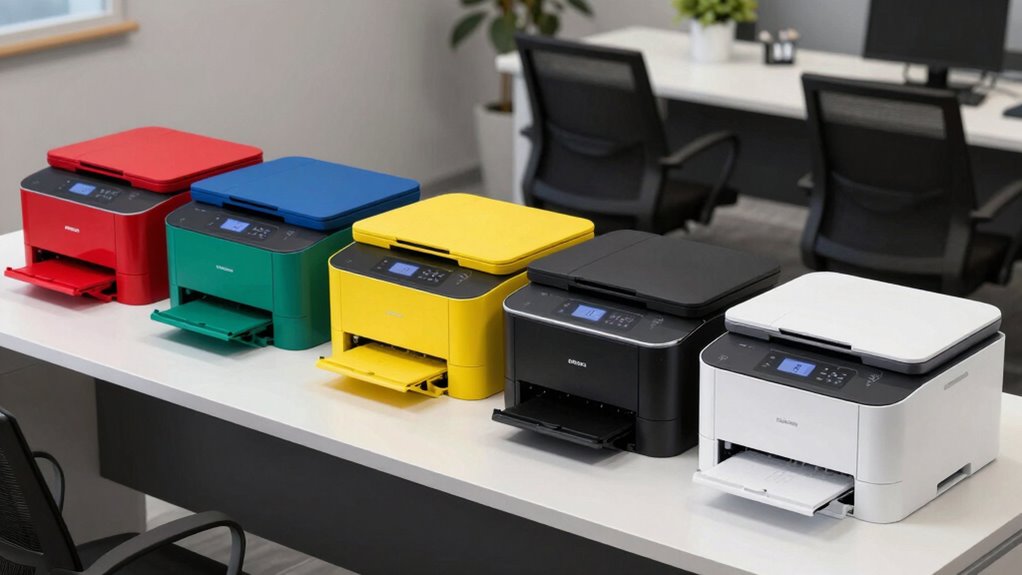
Choosing the right color laser printer for office use involves balancing print quality, speed, cost, and features. The Brother MFC-L3720CDW stands out as the best overall for its versatility and reliable performance, while the Canon Color imageCLASS MF753Cdw II offers premium features for busy offices. Other options like the HP Color LaserJet Pro 3201dw focus on affordability, but may sacrifice some speed or print quality. The main tradeoffs in this category include balancing upfront costs against ongoing toner expenses and deciding whether to prioritize multifunction capabilities or simple printing. Keep reading for a detailed breakdown to find the best fit for your office.

Get school and study supplies delivered free — and shop member deals
- Fast, free delivery on millions of items
- Access to Prime Big Deal Days deals on October 6–7
- Prime Video, Amazon Music and more included
Key Takeaways
- The top-ranked printers balance speed, print quality, and cost efficiency, making them suitable for busy office environments.
- Multifunction models offer added value with scanning, copying, and faxing, but often come with higher price tags and larger footprints.
- Toner efficiency and ongoing costs are critical considerations, especially for high-volume printing needs.
- Ease of use and connectivity features, such as wireless and mobile printing, significantly impact day-to-day usability.
- Premium options tend to offer better build quality and faster print speeds but come at a higher initial investment.
| Brother MFC-L3720CDW Wireless Color Laser Printer with Scanner, Copier, and Fax |  | Best Overall for Small Office Multifunctionality | Print Speed: up to 19 ppm | Scan Speed: up to 29/22 ipm (black/color) | Paper Capacity: 250 sheets | VIEW ON AMAZON | See Our Full Breakdown |
| Canon Color imageCLASS LBP646Cdw Wireless Laser Printer – White |  | Best Compact Printer for Solo or Small-Space Use | Printer Type: Laser | Color: Color | Wireless: Yes | VIEW ON AMAZON | See Our Full Breakdown |
| HP Color LaserJet Pro 3201dw Wireless Color Laser Printer |  | Best for High-Quality Office Output with Wireless Convenience | Printer Type: Laser | Print Speed: 26 PPM | Color: Yes | VIEW ON AMAZON | See Our Full Breakdown |
| HP Color LaserJet Pro MFP 3301sdw Wireless All-in-One Color Laser Printer |  | Best for Small Office All-in-One Needs with Security | Printer Type: Laser | Print Speed (Color): 30 ppm | Print Speed (Black & White): 26 ppm | VIEW ON AMAZON | See Our Full Breakdown |
| Xerox C235dni Wireless Color Laser All-in-One Printer |  | Best for Budget-Conscious Small Office Printing | Print Speed: 24 ppm | Monthly Duty Cycle: up to 1500 pages | Touchscreen: 2.8-inch color | VIEW ON AMAZON | See Our Full Breakdown |
| Canon Color imageCLASS MF753Cdw II – All-in-One Color Duplex Laser Printer |  | Best All-in-One for Small Offices | Printer Type: Laser | Color: Yes | Wireless: Yes | VIEW ON AMAZON | See Our Full Breakdown |
| color laser printers for office | Print Speed | Printer Type | Paper Capacity | Auto Document Feeder |
|---|---|---|---|---|
| Brother MFC-L3720CDW Wireless | up to 19 ppm | — | 250 sheets | 50 sheets |
| Canon Color imageCLASS LBP646C | 26 PPM | Laser | 250 sheets | — |
| HP Color LaserJet Pro 3201dw W | 26 PPM | Laser | 250 sheets | — |
| HP Color LaserJet Pro MFP 3301 | — | Laser | — | 50 sheets |
| Xerox C235dni Wireless Color L | 24 ppm | — | — | 50 sheets |
| Canon Color imageCLASS MF753Cd | 35 pages per minute | Laser | — | — |
More Details on Our Top Picks
Brother MFC-L3720CDW Wireless Color Laser Printer with Scanner, Copier, and Fax
The Brother MFC-L3720CDW stands out for seamlessly combining printing, scanning, copying, and faxing in one device suited for small offices. Its rapid print speeds of up to 19 ppm and automatic duplex printing help keep workflows moving efficiently. Unlike the Canon LBP646Cdw, which is more compact and primarily print-focused, this model offers a broader feature set that caters to multi-tasking needs. However, its setup can be complex, and the requirement to enroll in subscription services for full features might discourage some users. The higher initial cost reflects its versatility, making it ideal for offices needing an all-in-one device with reliable connectivity options like Wi-Fi, Wi-Fi Direct, and USB. For users looking for a multi-function printer that balances speed, connectivity, and security, this is a compelling choice.
Pros:- Fast print and scan speeds suitable for busy small offices
- Multiple connectivity options including wireless, cloud, and USB
- Intuitive 3.5-inch touchscreen with customizable shortcuts
- Automatic duplex printing to save paper
Cons:- Complex setup process may challenge less tech-savvy users
- Requires enrollment in subscription services for full feature access
Best for: Small office teams needing a versatile, all-in-one color laser printer with fax capabilities
Not ideal for: Very small home offices or users who only need a basic printer without scanning or faxing
- Print Speed:up to 19 ppm
- Scan Speed:up to 29/22 ipm (black/color)
- Paper Capacity:250 sheets
- Auto Document Feeder:50 sheets
- Connectivity:Wi-Fi (2.4GHz/5GHz), Wi-Fi Direct, USB 2.0
- Touchscreen:3.5-inch color display
Our verdict“Ideal for small offices that need an all-in-one printer with fast, reliable performance and comprehensive connectivity.”
Canon Color imageCLASS LBP646Cdw Wireless Laser Printer – White
The Canon imageCLASS LBP646Cdw offers a slim, space-saving design combined with a fast print speed of 26 ppm, making it ideal for small offices or home setups where space is limited. Its high-capacity toner reduces the frequency of replacements, which is advantageous compared to the more feature-rich HP Color LaserJet Pro 3201dw, which, while offering additional functions, is bulkier and more expensive. This Canon model focuses exclusively on printing, lacking scanning or copying functions, so it’s less suited for offices needing an all-in-one solution. Its 5-inch LCD screen provides straightforward control, but its limited functionality and focus on printing mean it’s best for users who need quick, high-quality color prints without extra features.
Pros:- Compact design ideal for small spaces
- Fast print speeds of up to 26 ppm
- Wireless connectivity and mobile printing support
- High-capacity toner reduces replacement frequency
Cons:- Limited to printing; no scanning or copying functions
- No color scanning or multi-function features
- Not suitable for high-volume or multi-tasking environments
Best for: Individuals or small offices needing a space-efficient, high-speed color laser printer for printing only
Not ideal for: Offices requiring scanning, copying, or multifunction capabilities
- Printer Type:Laser
- Color:Color
- Wireless:Yes
- Print Speed:26 PPM
- First Print Time:10.3 seconds
- Paper Capacity:250 sheets
Our verdict“Best suited for single-user or small office environments focused solely on high-quality color printing in tight spaces.”
HP Color LaserJet Pro 3201dw Wireless Color Laser Printer
The HP Color LaserJet Pro 3201dw offers an excellent blend of high-quality color output and fast speeds of 26 ppm, making it well-suited for professional environments where vibrant, crisp documents matter. Its dual-band Wi-Fi ensures stable wireless connections, comparable to the Xerox C235dni, but with a more streamlined setup. The limited input tray capacity and single input tray can be a bottleneck during high-volume printing, and its reliance on cartridges with HP chips can limit third-party options. Compared with the HP MFP 3301sdw, which includes scanning and copying, this model is more streamlined but less versatile. It’s best for users who prioritize print quality and speed over multifunctionality and are comfortable with HP cartridges.
Pros:- Fast print speeds of up to 26 ppm
- High-quality color output with crisp details
- Reliable dual-band Wi-Fi connectivity
- Automatic duplex printing to save paper
Cons:- Limited to cartridges with HP chips, restricting third-party options
- Heavy at 33 pounds, less portable
- Only one input tray limiting media options
Best for: Small businesses or professionals needing fast, high-quality color printing with reliable wireless connection
Not ideal for: Offices requiring scanning or copying functions, or those seeking a more expandable paper capacity
- Printer Type:Laser
- Print Speed:26 PPM
- Color:Yes
- Wireless Connectivity:Dual-band Wi-Fi
- Auto Duplex:Yes
- Paper Capacity:250 sheets
Our verdict“Best for professionals who need fast, high-quality color prints with dependable wireless performance in a compact design.”
HP Color LaserJet Pro MFP 3301sdw Wireless All-in-One Color Laser Printer
The HP Color LaserJet Pro 3301sdw combines printing, scanning, copying, and wireless connectivity into a single device tailored for small office teams. Its 30 ppm color printing speed and automatic duplex features mirror the needs of busy workspaces, similar to the Xerox C235dni but with added multifunctionality. Despite this, its reliance on original HP toner cartridges with limited yields and larger footprint could be drawbacks for tight spaces or cost-conscious buyers. The inclusion of security features and Ethernet options adds value for offices handling sensitive documents. This model makes the most sense for teams that need all-in-one capabilities with robust security, though it’s less suitable for high-volume printing due to toner costs and size.
Pros:- Fast print, scan, and copy speeds suitable for office workflows
- Auto-duplex, Wi-Fi, Ethernet, and secure printing features
- All-in-one functionality with high-quality output
- Supports printing up to 1,500 pages per month
Cons:- Relies on costly original HP toner cartridges with limited yields
- Relatively large footprint for small spaces
- Limited to HP cartridges with chips or circuitry
Best for: Small office teams needing a secure, reliable all-in-one color laser printer with fast performance
Not ideal for: Very high-volume printing environments or offices with limited space
- Printer Type:Laser
- Print Speed (Color):30 ppm
- Print Speed (Black & White):26 ppm
- Maximum Duty Cycle:1500 pages
- Auto Document Feeder:50 sheets
- Connectivity:Wi-Fi, Ethernet, USB
Our verdict“Best for small teams needing a secure, multifunction device that balances speed with comprehensive features.”
Xerox C235dni Wireless Color Laser All-in-One Printer
The Xerox C235dni offers a reliable, straightforward solution for small offices needing dependable color printing, scanning, and copying. Its 24 ppm speed is slightly slower than the HP 3201dw but still suitable for most small office workflows. The device’s easy setup, Wi-Fi, and mobile printing support make it accessible for less technically inclined users. The 2.8-inch touchscreen simplifies operation, but the limited monthly duty cycle of 1,500 pages restricts high-volume tasks, which makes it less ideal compared to the HP MFP 3301sdw for larger workloads. Its lower price point and decent feature set make it a good choice for those prioritizing affordability without sacrificing essential multifunction capabilities.
Pros:- Affordable price point for multifunction color printing
- Easy to set up with wireless and mobile support
- Reliable performance for small-volume tasks
- Includes auto document feeder for multi-page copying and scanning
Cons:- Limited to 1,500 pages per month, not suitable for heavy use
- Starter toner yields only 500 pages, additional cartridges needed
- No Ethernet port for wired network connection
Best for: Small offices or home-based businesses needing a budget-friendly, multifunction color laser printer
Not ideal for: High-volume environments or offices requiring extensive scanning or advanced security features
- Print Speed:24 ppm
- Monthly Duty Cycle:up to 1500 pages
- Touchscreen:2.8-inch color
- Auto Document Feeder:50 sheets
- Connectivity:Wi-Fi, Wi-Fi Direct, USB
- Processor:1 GHz dual-core
Our verdict“Best for budget-conscious small offices needing dependable multifunction color printing without extensive volume demands.”
Canon Color imageCLASS MF753Cdw II – All-in-One Color Duplex Laser Printer
The Canon imageCLASS MF753Cdw II stands out as a versatile all-in-one solution, combining high-speed printing with robust scanning, copying, and faxing capabilities. Compared to the HP Color LaserJet Pro 3301sdw, it offers faster print speeds of up to 35 pages per minute, making it ideal for busy environments that need quick turnaround times. Its 5-inch color touchscreen simplifies operation, especially for users who prefer intuitive controls over button-heavy models. The expandable paper capacity of up to 850 sheets ensures it can handle high-volume workloads without constant refilling, which is beneficial for small offices with heavy printing demands. However, its weight of over 60 pounds and large footprint could be barriers for those with limited space or who need portable solutions. Initial setup might also be more involved due to its comprehensive features, requiring careful configuration. This pick makes the most sense for small or home offices that require a reliable, multifunction device capable of handling frequent, high-volume printing tasks.
Pros:- Fast print speeds of up to 35 pages per minute for quick document turnaround
- User-friendly 5-inch color touchscreen simplifies operation
- Supports wireless and mobile printing for convenience
- High paper capacity with expandable options up to 850 sheets
Cons:- Heavy weight of 60.6 pounds makes it difficult to move
- Large footprint may require dedicated space in the office
- Setup process could be complex for less tech-savvy users
Best for: Small business owners and busy home office users who need a reliable, high-capacity all-in-one printer with fast speeds.
Not ideal for: Small spaces or users who need a lightweight, portable printer, as the MF753Cdw II is bulky and heavy.
- Printer Type:Laser
- Color:Yes
- Wireless:Yes
- Duplex:Yes
- Functions:Print, scan, copy, fax
- Print Speed:35 pages per minute
- Maximum Media Size:Legal (8.5 x 14 inches)
- Maximum Sheet Capacity:250 sheets (standard), expandable to 850 sheets
- Item Weight:60.6 pounds
Our verdict“This all-in-one model is best suited for small offices that prioritize speed, volume capacity, and multifunctionality over portability.”

How We Picked
These printers were selected based on a combination of performance, usability, build quality, and value. Priority was given to models that deliver reliable color printing with fast speeds, especially suited for office environments. We also considered ongoing costs like toner efficiency and maintenance requirements, as well as features such as wireless connectivity and multifunction capabilities. Each product was evaluated to highlight who benefits most from the features offered and what tradeoffs exist, ensuring that each selection fills a distinct role in an office setting. The ranking reflects a balance of these factors to help buyers find the best overall, most cost-effective, and feature-rich options for 2026.| color laser printers for office | Connectivity | Color |
|---|---|---|
| Brother MFC-L3720CDW Wireless | Wi-Fi (2.4GHz/5GHz), Wi-Fi Direct, USB 2.0 | — |
| Canon Color imageCLASS LBP646C | — | Color |
| HP Color LaserJet Pro 3201dw W | — | Yes |
| HP Color LaserJet Pro MFP 3301 | Wi-Fi, Ethernet, USB | — |
| Xerox C235dni Wireless Color L | Wi-Fi, Wi-Fi Direct, USB | — |
| Canon Color imageCLASS MF753Cd | — | Yes |
Factors to Consider When Choosing Color Laser Printers For Office
When selecting a color laser printer for office use, it’s important to weigh several key factors beyond just print quality. Consider your office’s volume to determine whether a high-capacity toner or faster print speeds are necessary. Connectivity options, such as wireless, Ethernet, or mobile printing, can streamline workflows. Multifunction capabilities add convenience but may increase costs and size. Budgeting for ongoing toner expenses is essential, as color laser printing can be costly over time. Lastly, assess the build quality and ease of maintenance to minimize downtime and support long-term use.Print Speed and Volume
Office environments often require high-volume printing with quick turnaround times. Look for printers with a high pages-per-minute (PPM) rating and robust duty cycles to handle daily workloads. Sacrificing speed for quality can slow down productivity, especially in busy settings. However, over-investing in speed may not be necessary for small offices with limited printing needs. Match your office’s volume with the printer’s capacity to avoid frequent refills or slowdowns.
Cost of Consumables
Toner costs can significantly impact the total cost of ownership. High-yield toner cartridges reduce the frequency of replacements and lower per-page costs, which is vital for high-volume offices. Some models offer compatible or third-party toner options, but these may affect print quality or void warranties. Carefully consider ongoing expenses versus initial purchase price to avoid overspending over the printer’s lifespan.
Multifunction Capabilities
Features like scanning, copying, and faxing add versatility but also increase complexity and upfront costs. For offices that need these functions regularly, investing in a multifunction model makes sense. For smaller teams or those with limited multifunction needs, a dedicated printer may be more cost-effective. Always balance the added convenience against the potential for higher maintenance and repair costs.
Connectivity and Ease of Use
Wireless connectivity, mobile printing, and cloud integration streamline workflows and reduce clutter. Intuitive interfaces and touchscreen controls enhance usability, especially for staff unfamiliar with tech. Consider whether the printer supports your office’s preferred devices and operating systems, and check for compatibility with your existing network infrastructure to avoid setup hassles.
Size and Design
Office space can be limited, so selecting a compact model or one with a small footprint is often beneficial. Larger multifunction printers may offer more features but can take up valuable desk or storage space. Evaluate your space constraints carefully and choose a design that fits seamlessly into your office layout without sacrificing necessary functionality.
Frequently Asked Questions
How much should I expect to spend on toner for a color laser printer?
Ongoing toner costs vary widely depending on the model and toner capacity. High-yield cartridges can last much longer and reduce per-page costs, making them more economical for high-volume printing. Budget models might have cheaper initial prices but could incur higher toner expenses over time. It’s important to compare toner prices and yield estimates when choosing a printer to ensure long-term affordability.
Is a multifunction color laser printer worth the extra cost?
For offices that regularly need scanning, copying, or faxing, a multifunction model offers substantial convenience, consolidating several functions into one device. However, these models tend to be larger and more expensive initially and may have higher maintenance costs. If your office primarily prints documents, a dedicated printer might be more cost-effective, but for versatile use, multifunction models justify their price.
How important is print speed in an office color laser printer?
Print speed is a critical factor for busy offices where quick turnaround times matter. Faster printers reduce wait times and help keep workflows moving smoothly. However, the fastest models often come with a higher price tag and larger size. Balance your office’s volume needs with your budget, focusing on realistic speed requirements rather than the maximum rated speeds to avoid overspending.
Can I use third-party toner cartridges with these printers?
Many laser printers support third-party toner cartridges, which can lower ongoing costs. However, compatibility isn’t guaranteed, and inferior third-party toner may affect print quality or damage the printer over time. Some manufacturers void warranties if third-party toner is used. Always research compatibility and consider the tradeoff between savings and potential risks when opting for non-original supplies.
What features should I prioritize for a small office printer?
For small offices, compact size, ease of use, and wireless connectivity are often top priorities. Prioritize models with reliable color output and sufficient speed to meet your daily needs. Multifunction capabilities are beneficial if you need scanning or copying, but avoid models that are unnecessarily large or complex for your volume. Focusing on cost-effective, user-friendly options ensures smooth daily operations.
Conclusion
For busy offices seeking a reliable all-around performer, the Brother MFC-L3720CDW offers a balanced mix of speed, features, and cost-efficiency, making it the best overall choice. The Canon Color imageCLASS MF753Cdw II suits those needing premium build quality and advanced features, ideal for high-demand environments. If budget is a concern, the HP Color LaserJet Pro 3201dw provides solid performance at a lower initial price. Beginners or small teams with simple needs may prefer compact models with straightforward wireless setup. For offices requiring multifunctionality, investing in a model like the Xerox C235dni can streamline workflows without sacrificing quality. Ultimately, selecting the right printer depends on your specific volume, feature needs, and budget constraints.
As an affiliate, we earn on qualifying purchases.Fall Picks
fall essentials